Grocery store POS software for a busy counter and a full shelf
A grocery counter has a queue, loose goods and credit customers. SellyPOS covers each one, and the free Lite edition holds only 20 products.
A grocery store has a queue at the counter, many items at low prices, loose goods sold by weight and customers who pay later. Grocery store POS software has to handle all of that without making the queue wait. SellyPOS is grocery store POS software for one counter or for several. It is an installed Windows app, and it keeps selling when the internet goes down.
What a grocery counter has to do
Each sale can hold many items, and the cashier cannot stop to search for each one. Some goods have no barcode. Some are sold by weight. Food carries dates. Customers pay on credit, and stock must be counted. A general store that sells the same kinds of goods has the same needs.
Grocery store billing software at the counter
A scanned item is added to the sale at once, with no Enter press, and the scan field stays ready for the next one. If a label is damaged, type its last few digits. If a barcode is not in the shop yet, a prompt offers to create a product from the scan. The payment screen shows the change as you type the cash, and quick-tender chips offer the exact total in one press. Held sales set a basket aside while the next customer is served. See the sales counter.
Loose goods, weighed goods and items with no barcode
A loose product asks how much is sold, and the line is priced for the answer. For a product sold by weight, type the weight or the money, and the other fills in. For a product with no barcode, press Generate barcode on its form. A number is never reused. Pack levels are in every edition.
Pieces, boxes and cartons of one product
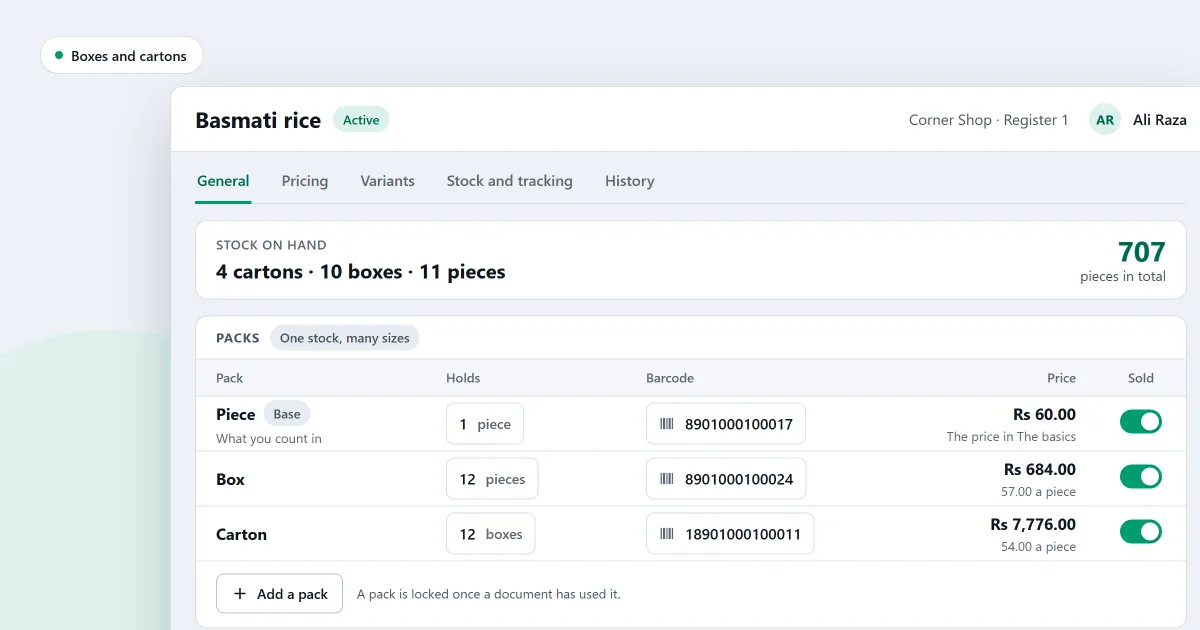
One product can be sold by the piece, the box and the carton, each at its own price. At the counter, each pack is its own search result. Stock is counted once, in the smallest unit, and shown as whole cartons, boxes and pieces, with the total in the smallest unit beside it. Sales, returns, held sales and bills keep the pack they were written in.
Mixed packs of different products are not supported. Ringing up single items does not switch to the box price by itself. A serial-tracked product cannot take pack levels.
Pack levels are in every edition, Lite included. Lite holds only 20 products, so a shop with a full shelf needs Basic or Professional.
Expiry dates on food and other goods
Expiry tracking is set for each product, so food, cosmetics and other goods can carry dates. Enter the expiry date when goods arrive. A delivery can carry a date with no batch number. The earliest-expiring stock is picked first, and an expired product is blocked. The expiring soon report lists what is about to expire. Expiry is in Basic and Professional.
Grocery store inventory management
Stock on hand lists every product, and each row opens its movements. Count by scanning barcodes, then review only the lines that differ. Sales made during a count are taken off once, so the count stays correct while you trade. The reorder list shows what is low, and it drafts one purchase order for each preferred supplier. Counts and reorders are in Basic and Professional. See stock control.
Credit customers and supplier bills
Credit is in Basic and Professional. Set a limit and a credit period for each customer. A credit sale over the limit is blocked, and the screen says why. A walk-in sale cannot be part paid on credit, so the cashier names a customer first. See customers and credit.
Supplier records, purchase orders and supplier payments are in every edition, Lite included. Record a delivery, its bill and any payment in one save. See purchases and suppliers.
Which edition a grocery store needs
- Lite is free for ever. It holds up to 20 products and shows the last 7 days of sales history. It has no backup, restore, import or export.
- Basic is for one counter. It adds credit, expiry, counts, reorders, import and backup. You pay once, for one computer.
- Professional is for several counters on one shop network. It adds barcode labels.
Basic and Professional each start with a 7-day free trial. Their prices are on the pricing page, not written here.
When the power or the internet fails
After a power cut, a recovery summary appears before the first sale and names any sale whose state was uncertain. A sale can be finished with no network connection. Basic backs up to a folder you choose, every day, and keeps a history of past backups.
Next
Read POS software by type of shop and how a sale is completed. For a larger shop, see supermarket POS software. Comparing free programs? Read grocery store software free download: what to check first. Then compare the editions and prices or download SellyPOS.
Questions people ask
What does a grocery store need from its POS software?
A grocery store needs a counter that adds scanned items at once, and lets the cashier sell loose goods by typing the weight. It needs expiry dates on food and other goods, credit for named customers, and bills and payments for its suppliers. Basic is for one counter. Professional adds several counters on one shop network. See grocery store POS software.
Is the free version enough for a grocery store?
Usually not. SellyPOS Lite is free for ever, but it holds up to 20 products. It shows the last 7 days of sales history and has no backup, restore, import or export. A grocery store usually has more products than that. Basic and Professional each start with a 7-day free trial, then a one-time licence. Their prices are on the pricing page.
How do I set SellyPOS up for my kind of shop?
At setup, choose your kind of shop from the tiles. The choice sets sensible defaults for the shop and decides which fields a new product shows. Choose your country from a list you can type to filter, and the currency, formats and time zone are filled in for you. You can change the business type later in Settings. To confirm, you type the word CHANGE, and the screen names what the new type changed. Settings you changed yourself are left alone. See POS software for your kind of shop.