Grocery store software free download: what to check
Grocery store software free download: check loose goods, cartons, credit, supplier bills and power cuts first, then see what the free Lite edition holds.
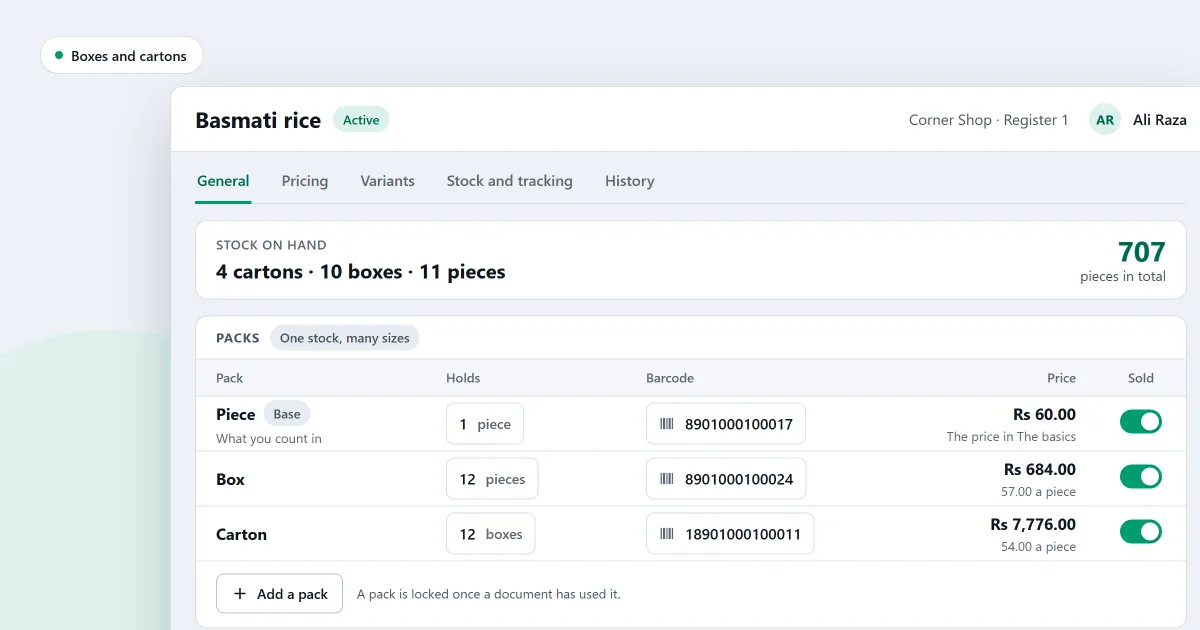
You want a grocery store software free download before you spend any money. Many small items go through each sale at a grocery counter. Some goods are loose and must be weighed or measured. Cartons are bought whole and sold by the piece. A few regular customers pay later, and deliveries arrive from several suppliers, each with a bill. A free program has to handle all of that.
A checklist comes first, then where SellyPOS stands and which edition holds each part.
Is a grocery store software free download enough?
Some free programs do one part of the shop well and leave the rest out. Others hold so few products that a full shelf will not fit.
A checklist for any free grocery software
Put each question to the seller, then try the answer yourself. If you run a general store, the same list applies.
- Does every pack have a barcode? If not, can the program make one in the shop?
- Can the cashier sell loose goods, and set the weight or the amount on the line?
- Can one product be sold as a piece, a box and a carton, with one stock count?
- Can a named customer buy on credit, with a limit? Can you see who owes you?
- Can you record a supplier’s delivery and its bill, and see what you owe each supplier?
- Can each product carry expiry dates, such as on packed food? Does the counter stop an expired item?
- What happens to a sale if the power is cut in the middle of it?
- Can your records leave the program as a file? Can you restore a copy of them?
- Is the program free for ever, or only for a trial?
Questions 7 and 8 decide what you can lose on a bad day.
Where SellyPOS stands
SellyPOS is an installed Windows program, not a browser app. It runs on one counter, or on several with Professional. Lite is the free edition. If you search for grocery store billing software free download, the counter is what Lite covers.
At the counter
- Scanning: a scanned product goes into the sale at once, with no Enter press. Lite included.
- Barcodes: a product with no barcode can be given one from the shop’s own prefix. Lite included. Printing barcode labels is Professional only.
- Loose and weighed goods: a loose product asks how much is sold. For a product sold by weight, typing the weight or the money fills in the other on its cart line. Lite included.
- Pieces, boxes and cartons: one product can be sold in each pack, each with its own barcode, price and cost. Lite included.
- Held sales and power cuts: hold a cart, serve the next customer, and resume the first exactly as it was. After a power cut, a recovery summary appears before the first sale. A sale can be finished with no network connection. Lite included.
Credit, suppliers and expiry
- Who owes you: the Customers page lists who owes you and who you owe. Lite included.
- Credit limits: set a limit and a credit period for each customer. A credit sale over the limit is blocked, and the screen says why. Basic and Professional.
- Supplier deliveries: record a delivery against a purchase order or with no order, and enter a supplier’s bill against goods already received. The bills list shows what is late. Lite included. Who you owe, by supplier, is Basic and Professional.
- Expiry dates: any kind of product can carry expiry dates, packed food included. A delivery can carry a date with no batch number. An expired batch is refused or warned about. Basic and Professional.
- Stock counts and reorders: count by scanning, then apply only the difference. Products that run low appear on a reorder list. Basic and Professional. See stock control.
Backups and files
- Backups and files: back up the shop’s data to a folder you choose. Export products, customers, suppliers or the sales list to a file, and import products from a spreadsheet. Restore shows what will be lost before it runs. Basic and Professional. Lite has none of these.
SellyPOS Lite is free for ever, with no trial and no licence. It holds up to 20 products, shows the last 7 days of sales history and returns, and has no backup, restore, import or export. Basic and Professional each start with a 7-day free trial; after it, they are a one-time payment, and the price is on the pricing page. Moving up keeps your data.
A full grocery shelf needs Basic or Professional. For grocery store inventory management software, expiry, stock counts and reorders are Basic and Professional. Credit sales and backups are not in Lite either.
If you want to try it
- Check that the computer runs Windows 10 (version 1809 or later) or Windows 11, 64-bit.
- Install SellyPOS from the download page. The install guide is there too.
- Sign in with Google once at setup. Lite needs it too.
- Choose an edition with the edition guide. A shop gets one trial, whichever edition it runs.
- Enter five or six of your own products, one loose and one carton, and ring up a basket. Do this before you rely on the program.
Next
Read grocery store POS software for the whole counter, and free POS software for PC for the exact limits of Lite. For a larger shop, see which software suits a supermarket. Then compare the editions and prices or download SellyPOS.
Questions people ask
Is SellyPOS Lite really free?
Yes, for ever: no trial, no licence and no lock. Lite holds up to 20 products, shows the last 7 days of sales history and returns, and has no backup, restore, import or export. When you need more, install Basic or Professional over the same data.
How long is the free trial?
Basic and Professional each start with a 7-day free trial. A shop gets one trial, whichever edition it runs. When the trial ends, SellyPOS keeps selling, and the other screens wait until you activate a licence.
Is the free version enough for a grocery store?
Usually not. SellyPOS Lite is free for ever, but it holds up to 20 products. It shows the last 7 days of sales history and has no backup, restore, import or export. A grocery store usually has more products than that. Basic and Professional each start with a 7-day free trial, then a one-time licence. Their prices are on the pricing page.