Free POS software for PC that keeps selling with no internet
Free POS software for a Windows PC that sells with no internet. Lite is free for ever, with limits you should know before you install it.
You run a small shop. You search for free POS software for PC because you want to sell at the counter before you pay for anything. SellyPOS Lite is free POS software for PC. It is free for ever, it runs on Windows, and it sells with no internet connection.
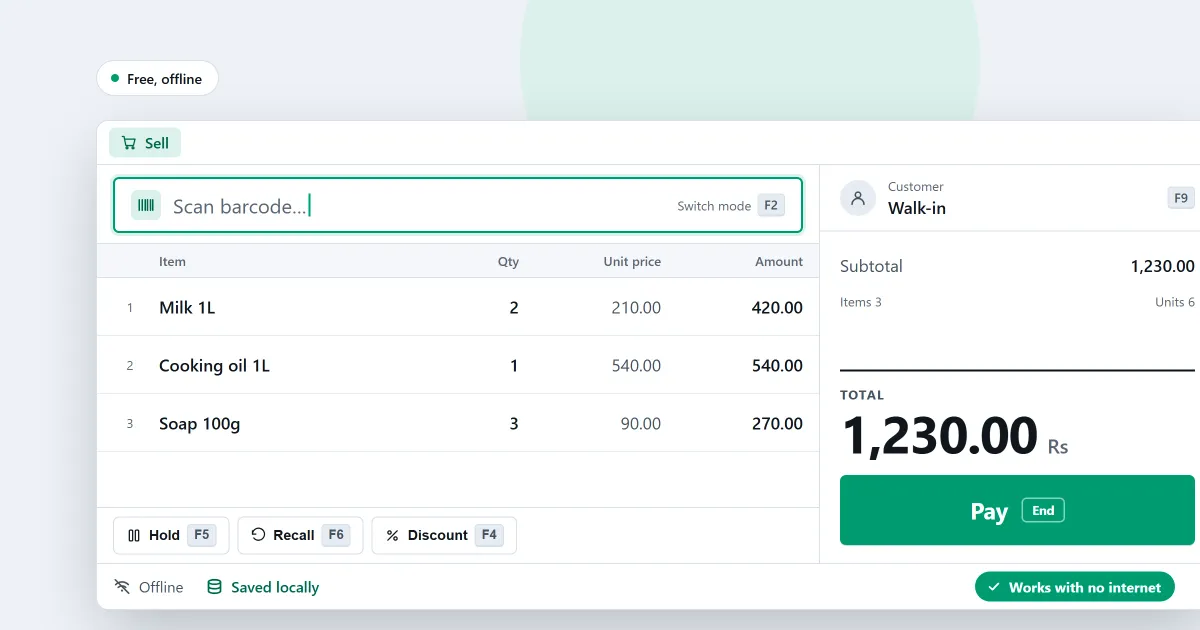
Lite is free because it has limits. This page sets them out before you install anything.
Point of sale software free download: what you get
Lite includes the counter work a shop does every day:
- Selling at the counter. The Sales screen opens ready to sell. A scanned code that matches a product is added at once.
- Selling from the keyboard. A keyboard map completes the whole sale. Press F1 on any screen to see the shortcuts you may use.
- Searching by name. Type the words of a name in any order. A small typo still finds the product.
- A barcode scanner. Test it in its own try-it box before the first sale. See barcode scanning.
- A receipt printer. A USB receipt printer is found when you plug it in. Receipts print in the background. If the printer is off, the sale is still saved. See receipt printing.
- Held sales. Hold a sale and serve the next customer. Recall it later, exactly as it was. See held sales.
- Returns and corrections. Return some or all of a finished sale. A return cannot go above what is left to return. A finished return can be corrected by replacing it. See returns and exchanges.
- Purchase bills and supplier payments. Enter a supplier’s bill against the deliveries it covers. A payment to a supplier is spread across their open bills, oldest first.
- Customers, products and stock. Add a customer with only a name or a phone number, and a product with only a name, price and unit. See stock on hand for each product, and adjust it with a reason.
- Working offline. A sale can be finished with no network connection. After a sudden shutdown, the app checks whether the last sale completed.
- Correcting a finished sale. A manager or owner can correct a finished sale by replacing it. The original stays in history, marked void. See billing software for a small shop for how it works.
- Selling by the piece, box and carton. One product can have pack levels, each at its own price. Each pack is its own search result at the counter.
What the free version leaves out
Lite has these limits, and the software says so on screen:
- It holds up to 20 products.
- Sales history, returns and the orders dashboard show only the last 7 days.
- It has no backup, restore, import or export. A failed hard disk on a Lite computer loses its records.
A shop with more than 20 products needs Basic or Professional. Credit sales, reports, backup and restore, and import and export are in Basic and Professional, not in Lite.
When you need more
Basic and Professional each start with a 7-day trial. A shop gets one trial, whichever edition it runs. When the trial ends, you can still make new sales. Returns, reprints and back-office work wait until a licence is activated. Choose an edition explains the difference.
Moving up keeps your data. Install Basic or Professional over the same data, and your records stay where they are.
Basic is a one-time payment for one computer. Professional is a one-time payment for the main computer, and the other tills on the shop network need no licence. There is no monthly fee for the software. The amounts are on the pricing page.
Shop software free download for PC: what computer you need
SellyPOS is an installed Windows app. It needs Windows 10 (version 1809 or later) or Windows 11, 64-bit. It is not a browser app, an Android app or a cloud service.
Download it from the download page and install it on the computer at the counter. The install guide shows the steps.
You sign in with Google when the shop is set up, and the shop is registered with Selly Systems at that point. The till then sells with no internet connection.
For example
A small shop has one counter, one barcode scanner and one receipt printer. The cashier scans each item, and the receipt prints. A customer who has forgotten their money is put on hold, and the next customer is served.
Next
See how selling works offline, grocery store POS software, inventory software for a small shop and billing software for a small shop. Read how much POS software costs and what the free version leaves out. Then compare prices and editions or download SellyPOS.
Questions people ask
Is SellyPOS Lite really free?
Yes, for ever: no trial, no licence and no lock. Lite holds up to 20 products, shows the last 7 days of sales history and returns, and has no backup, restore, import or export. When you need more, install Basic or Professional over the same data.
How long is the free trial?
Basic and Professional each start with a 7-day free trial. A shop gets one trial, whichever edition it runs. When the trial ends, SellyPOS keeps selling, and the other screens wait until you activate a licence.
What does the free version of SellyPOS leave out?
SellyPOS Lite holds up to 20 products. Sales history, returns and the orders dashboard show only the last 7 days. Lite has no backup, restore, import or export, and it says so on screen. A failed hard disk on a Lite computer loses its records. Credit sales, reports, backup and restore, and import and export are in Basic and Professional. See the free POS software page.
Does the free SellyPOS work on a PC with no internet?
Yes. A sale can be finished with no network connection, so a dead connection does not stop the counter. You need the internet once, to sign in with Google when the shop is set up. SellyPOS is an installed Windows app, not a browser app, so the till runs on the computer itself.
If I start on the free version, do I lose my data when I upgrade?
No. To move up, install Basic or Professional over the same data. Your records stay where they are, because every edition uses the same records. Basic and Professional are a one-time payment, and the pricing page shows the amounts.