Sales, receipts and credit: billing software for a small shop
A bill written by hand or in a spreadsheet does not match the till. SellyPOS puts each sale, payment and receipt on one Sales screen.
A customer is waiting. You write the bill on a pad, or in a spreadsheet, and add it up again because the total does not look right. Then the customer asks for a receipt, and you cannot find the one you made. Billing software for a small shop puts each sale on one Sales screen, so the bill, the payment and the receipt come from the same record.
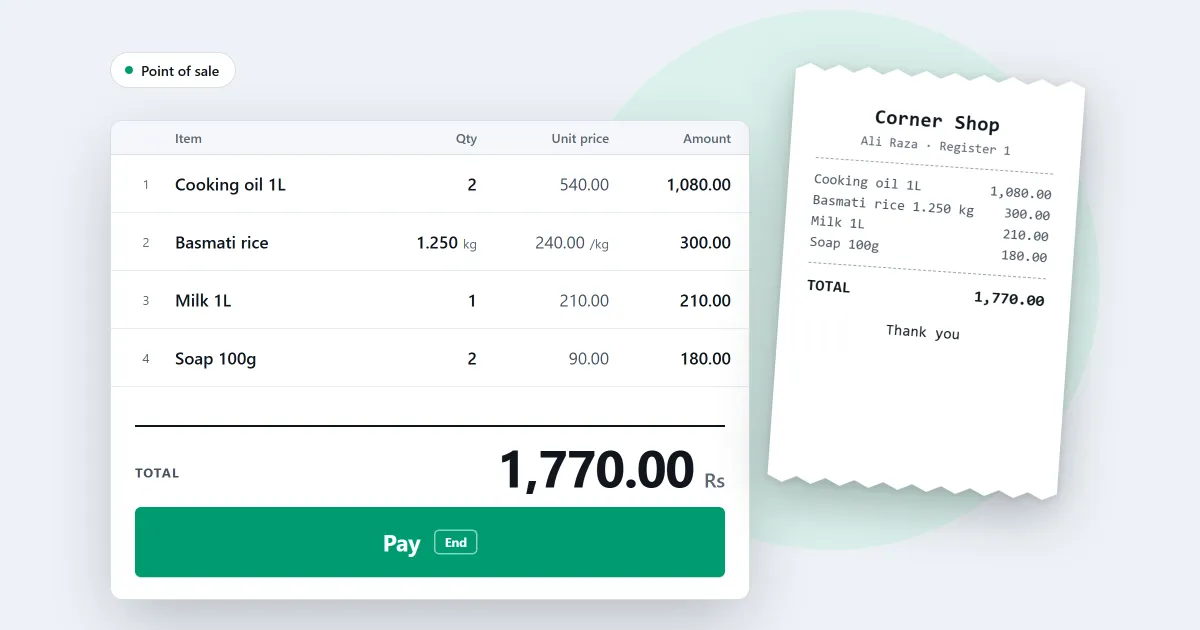
SellyPOS is billing software for a small shop. It is shop billing software that sells with no internet connection, and every edition has the Sales screen.
Ring up a sale on the Sales screen
In every edition, the Sales screen opens ready to sell, with the entry field ready for a scan. One field works out what you typed. An exact barcode, SKU or code adds the product at once, and anything else opens a search list. Search finds products that contain every word you type, in any order, and it forgives small typos.
Each cart line has its own minus, plus and remove controls. Undo steps back through up to 20 cart actions. See how a sale is completed.
Discounts on a line or the whole bill
In every edition, you type a percentage or an amount for one line or for the whole bill. A discount above your role’s limit goes for approval, and if approval is refused it does not apply. A product marked as not discountable is refused, and the screen says why. In Basic and Professional, a customer’s group discount comes off the sale by itself.
Payment and change
The payment screen takes the cash the customer hands over, and it shows the change as you type. One sale can take more than one method, and Confirm stays off until nothing is left to pay. A method that needs a reference, such as a cheque number, asks for it on the same screen. In Basic and Professional, you turn payment methods on or off, rename them and archive them.
Receipt printing on a thermal printer
When a sale is finished, the completion step offers Print receipt. Receipts print on 58 mm or 80 mm thermal printers, connected by USB or Bluetooth. They print in the background, so the next sale can start while one prints. If the printer is off, the sale is still saved, and the screen says the receipt did not print. See receipt printing.
Reprints are marked as duplicates. In Basic and Professional, a reprint is drawn again with the receipt design you use now and marked COPY, and you can choose a receipt style.
Billing and invoice software: A4 invoices
In Basic and Professional, the completion step can print a full-page A4 invoice, or open WhatsApp on a number you pick with the invoice as a PDF or JPG. Lite does not print A4 invoices.
Credit sales and customer statements
In Basic and Professional, each customer can have a credit limit and a credit period in days. Zero means no credit. A credit sale over the limit is blocked, and the screen shows the limit, what the customer owes and the room left. If a customer pays part, the unpaid part becomes a balance on their account. A walk-in sale cannot be part paid on credit, so the cashier identifies or creates the customer first.
Each customer’s ledger lists every amount owed and paid, with a running balance. Entries cannot be edited, so a correction is a new entry. A statement covers any date range, and it can be shared on WhatsApp or saved as a PDF. SellyPOS sends nothing by itself. See customers and credit.
Returns, exchanges and held sales
In every edition, you can return some or all items from a finished sale, with a reason for each line. A quantity above what is left after earlier returns is refused. An exchange takes replacements in the same sale: the difference is paid, or refunded if the replacements cost less. A finished sale is corrected by replacing it, and a void adds new linked records that reverse it. See returns and exchanges.
You can also hold a sale in every edition. Hold the cart with one action, and a new one starts at once. When the customer returns, pick the held sale from the list, and it comes back as it was held. See held sales.
Correct a finished sale
A manager or owner presses Correct this sale on a finished sale’s page. The sale reopens in the cart, and nothing changes until you finish. Finishing replaces the original, which stays in history, marked void. A reason is asked and recorded.
Only paid or credit sales can be corrected, not sales that spent store credit or a voucher, exchange replacement sales or sales in a closed session.
What Lite shows
Lite holds up to 20 products. It shows the last 7 days of sales history and returns, and it has no backup, restore, import or export. Basic and Professional add credit sales, customer statements, A4 invoices and backup. Compare them on the pricing page.
Next
See the sales counter, then stock on hand. If the names confuse you, POS software vs billing software vs inventory software sets them side by side. Then download SellyPOS or compare prices and editions.
Questions people ask
Do I need a receipt printer or a barcode scanner?
No. Without a barcode scanner, you find products by typing their name or code, and receipt printing can be turned off when no printer is connected. When you add a receipt printer, SellyPOS works with 58 mm and 80 mm thermal printers over USB or Bluetooth. Hardware it works with.
Can I sell on credit?
Yes, in Basic and Professional. Each customer has a running balance: credit sales add to it, payments they bring in reduce it, and you can see who owes what at any time.
What can a bill do in SellyPOS, and which edition has it?
Every edition rings up a sale on the Sales screen, takes cash and other payment methods, and prints a receipt on a 58 mm or 80 mm thermal printer. Lite shows the last 7 days of sales history and returns. Basic and Professional add credit sales, customer statements, A4 invoices and backup. See choosing an edition.