Garment shop billing software for sizes, colours and shelf labels
One shirt, many sizes and colours. Each variant has its own barcode and stock, and the counter asks which one is sold.
A garment shop or cloth shop sells one shirt in several sizes and colours. Each size and each colour has to be counted, priced and sold on its own. Garment shop billing software keeps a product and its sizes and colours together, and each variant holds its own barcode and its own stock. SellyPOS is garment shop billing software and clothing store POS software. Sizes and colours are in Basic and Professional.
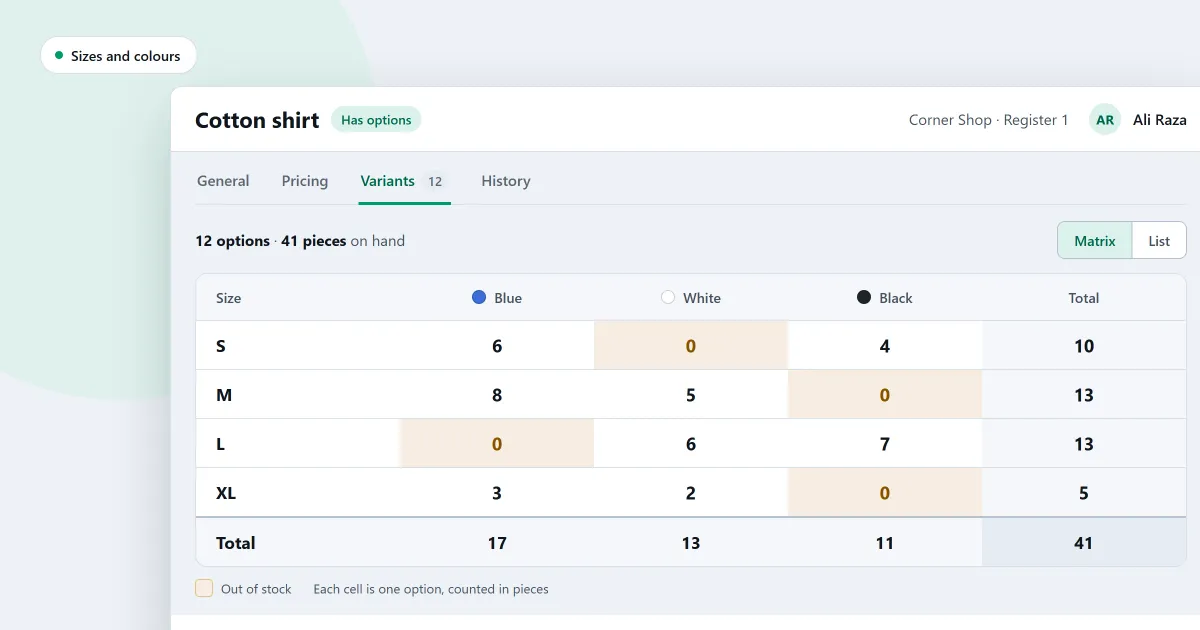
One product, with every size and colour
Attributes such as size and colour are kept once and reused across products. Every combination of the chosen values is created, except any excluded before creation. On a new product you tick the variants you want, and saving creates them once the product exists. Add an attribute with its values, such as size or colour, on the sizes and colours page.
Each variant keeps its own SKU, barcodes, cost, price and stock. Adding a value creates only the new variants.
Start with the clothing options already made
A garment shop or shoe shop chooses Garments or Shoes as its business type when it sets up SellyPOS. Garments starts with eight attributes and 103 values. Shoes starts with four attributes and 80 values.
See every size against every colour
A product’s variants can be shown as a grid of size against colour, with the stock of each variant. You can also open a product’s variants in one editable table, and change the price, cost, SKU and reorder levels of each.
Pick the right size at the counter
Type the name of a product that has variants, and the counter asks which one you mean. The list shows each variant’s availability. A scanned variant barcode goes straight to its own variant. If a product has no variant that can be sold, the counter refuses it and leaves the cart as it was.
Garment shop billing: sales, returns and exchanges
Pick the size and colour at the counter, then take payment. Several payment methods can share one sale.
A return can cover all of a sale, part of it or several lines. It loads the original prices and discounts, and it refuses a quantity above what is left. The return reason decides whether the goods go back on the shelf, are held in quarantine or are written off. See how a return works.
An exchange takes goods back and takes replacements in the same sale. The difference is paid, or refunded if the replacements cost less.
Discounts are given on one line or on the whole bill, as a percentage or an amount. A discount above the limit for your role needs approval. A product marked as not discountable is refused. In Professional, discount promotions on chosen products apply by themselves at the counter.
Share leftover stock out to the sizes
A product with variants can still hold stock of its own. A banner on the product page shows how much stock is on no variant. The Distribute stock window gives that stock to the variants, or adjusts the rest out through an ordinary stock adjustment. While stock is left on the main product, the counter will not sell it or its variants.
Buy and count every size in one go
On purchase orders, goods received, quick purchase and stock adjustments, picking a product with variants adds a line for each active variant, with no quantity. Picking one variant adds only that variant. The purchases and suppliers page shows these documents.
Size labels for shelves and price tags
A size label prints only the short code of the size, such as M or XL. Each barcode design chooses which attribute its size reads, so one shop can have a shirt design, a shoe design and a belt design. Each attribute value has a label code of up to four characters, which the value form asks for.
Each barcode design also chooses whether a label prints the variant’s full name or only the main product’s name. The full name is the default. The barcodes and labels page explains the designs.
Cloth shop: selling part of a unit
A product marked as loose and sold in a unit that allows decimals asks how much is being sold. The counter prices the line for that amount.
Bring in a clothing catalogue from a spreadsheet
The product import template has a Garments sample sheet, built from the shop’s own units, categories, brands and tax groups. The import products from Excel page explains each step.
Next
See how a sale is completed. Then download SellyPOS or compare prices and editions.
Questions people ask
Do I have to add every size of a shirt one at a time?
No. On purchase orders, goods received, quick purchase and stock adjustments, picking a product with variants adds a line for each active variant, with no quantity. Picking one variant adds only that one. Stock that sits on no variant can be given to the variants in the Distribute stock window, or adjusted out with an ordinary stock adjustment. A size label prints only the short code of the size, such as M or XL. You choose which attribute a size design reads, so a shirt design and a shoe design can differ. Choose garments or shoes as your business type at setup, or later in Setup, and the variant options are created for you. See POS software for clothing stores.