Medical store and pharmacy software that tracks MRP, expiry dates and lots
A medicine shop's till refuses a price above the MRP, lists expiring stock and keeps each medicine's generic name and strength.
A medical store must get three things right at every sale: the printed price, the expiry date and the lot. Medical store software keeps all three in front of the cashier at the counter. SellyPOS is medical store software and pharmacy POS software for a medicine shop. It keeps the MRP as a ceiling on every sale. In Basic and Professional it also tracks expiry dates and lots, and it can print your drug licence on the receipt.
Which software does a medical store need?
A medical store needs software that holds the printed price, shows which stock expires first and keeps each medicine’s details. The full checklist is in which software does a medical store need. SellyPOS does not keep prescriptions or a controlled-drug register.
An MRP price ceiling on every sale
The MRP is the maximum retail price printed on the goods. SellyPOS does not let any price go above it. A price you type above the MRP is refused. No setting and no approval allows a sale above it.
A product’s MRP works the same way: a selling price above it is refused, and a price equal to it is allowed.
Show the saving below the MRP on the receipt
When a medicine sells for less than its MRP, the receipt prints the MRP and the amount saved on that item. The total called You saved counts each saving once. The saving is shown only and is never booked as a discount.
Batch and lot tracking from delivery to sale
For a product that tracks expiry and lots, each delivered line takes its own expiry date and lot number. Batches and expiry are in Basic and Professional, not in Lite. The stock control page explains the batch screens.
At the counter, a batch-tracked product offers the batches with the earliest expiry first. Each one shows its expiry date and the quantity available. Under the product’s expiry policy, the counter refuses an expired batch with its own message. Or it warns and lets the sale go on with an override.
How MRP, expiry and lots help at the counter
The three checks run inside the same sale. The price cannot pass the MRP. The counter offers the batch that expires first. Selling an expired batch needs a reason from the shop’s own list. When the setting is on, the receipt shows the lot number.
Medicine expiry tracking and expiring stock
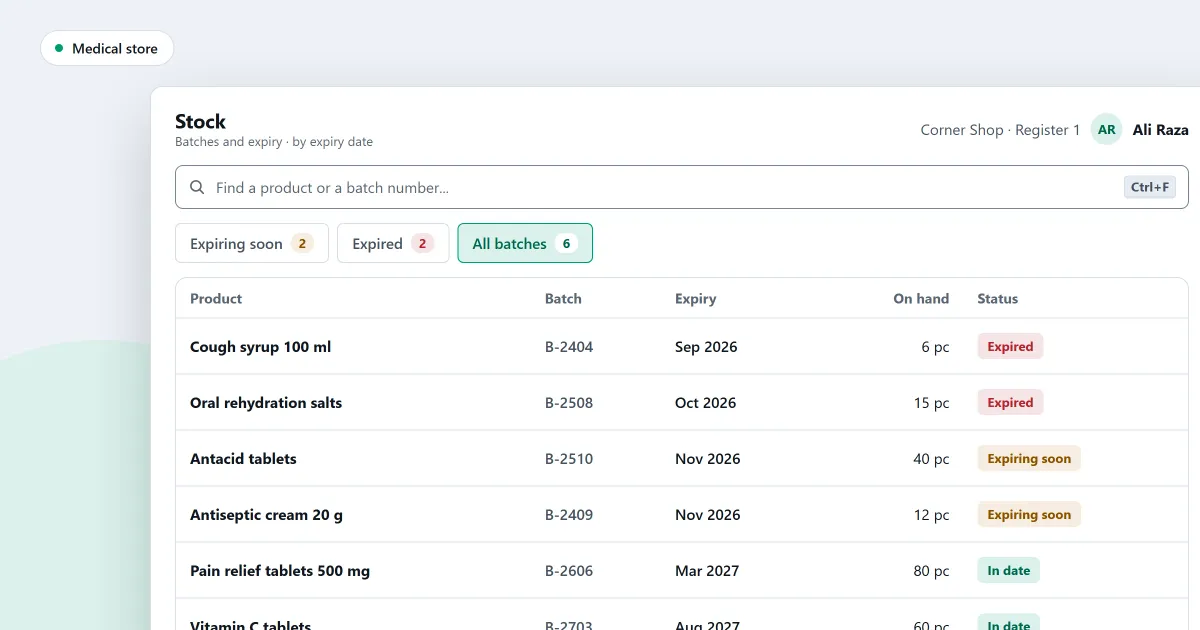
The Batches and expiry page lists stock that is expiring or has expired, by expiry date or by batch. You can write off an expired row, which moves it into a stock adjustment for that batch. A write-off with no batch chosen takes the stock that expires first.
The Expiring soon report lists products that expire in the next 30 days. It shows the days left, the value at cost, the day each product was received and its supplier. It sits in reports and alerts.
Trace a batch from delivery to where it went
Trace a batch to see its supplier and expiry date, where its stock went, what remains at each location, and any overrides. When the shop switches it on in Settings, a receipt also shows the lot number of the batch a sale came from.
Generic name and strength for each medicine
In a pharmacy shop, a product’s medicine details record its generic name, strength, dosage form and storage conditions. These are asked for and never required, so a product saves without them.
Your drug licence on the receipt
A pharmacy or supermarket records its drug licence number, the pharmacist’s name and the pharmacist’s registration number on Setup > Business profile. The licence field takes the name your country gives it. These lines print under the shop’s details on every receipt style, but only when the receipt design switch is on.
The A4 invoice prints the same lines under the same switch, set in setup and documents.
Medical store software price and editions
Lite is free for ever. It holds up to 20 products, so a medical store with more products needs Basic or Professional. Lite has no batch or expiry tracking and no backup. Basic and Professional are a one-time payment for each licence. The amounts are on the pricing page, and choosing an edition explains the 7-day trial.
Next
See how a sale is completed and the other kinds of shop SellyPOS runs. Comparing free programs? Read pharmacy software free download: what to check first. Then download SellyPOS or compare prices and editions.
Questions people ask
How does SellyPOS handle MRP and expiry dates for medicines?
No price can go above the product's MRP, and no setting or approval allows it. A typed price above the MRP is refused. A receipt shows the MRP and the amount saved below it, and the total You saved counts it once. The saving is only shown and is never booked. Expiry dates can be typed as month and year. Expired stock is refused at the counter or warned, depending on the product's expiry policy. Selling an expired batch needs a reason from the shop's own list, and a cashier without the permission needs a supervisor's approval. A medicine's generic name, strength, dosage form and storage conditions can be recorded. They are asked for, never required. See pharmacy POS software.