Pharmacy software free download: what to check
Pharmacy software free download: what to check for the printed price, expiry dates, lots and backups, and what SellyPOS Lite holds.
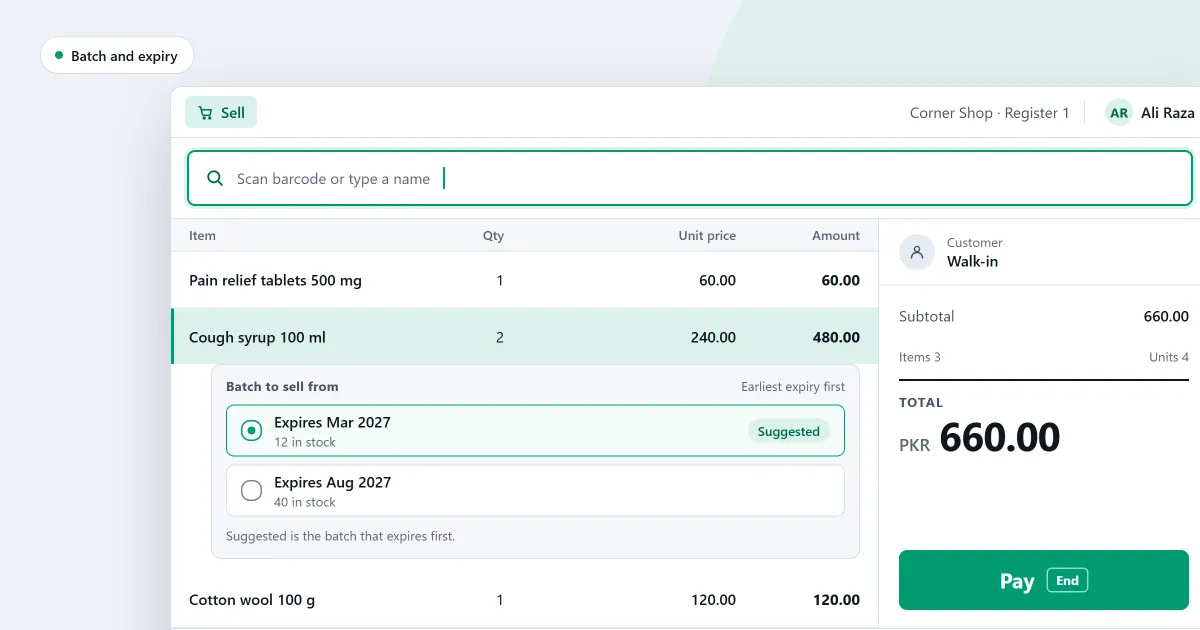
When you search for a pharmacy software free download, you want the counter running before you pay for anything. That is a sensible place to start. A medicine shop has three problems a general till does not face. It must not sell above the printed price. It must not sell a strip after its expiry date. And it has thousands of small products, many with similar names and a different strength for each.
Here is the short answer for SellyPOS. Its free edition, Lite, holds 20 products and has no batch or expiry tracking. A pharmacy that needs expiry dates and lots must start on Basic or Professional. Both begin with a 7-day trial, and then take a one-time payment for each licence.
What to check in a pharmacy software free download
Ask these questions before you install anything. Ask for the answers in writing, and test each one on the screen yourself.
- Does the till refuse a price above the printed price? Type one in. A pharmacy program should stop you there, not show a warning you can click past.
- Does each delivery keep its own expiry date and lot? Two deliveries of one medicine can expire on different days. They should stay apart, and the earlier one should be offered first.
- Can you open a list of what expires soon? Finding out from the shelf is too late. Look for a list you can check every week.
- Can each medicine keep its generic name and strength? Customers ask these at the counter. The fields may be left empty, but they should exist.
- Does your drug licence print on the receipt? The licence number and the pharmacist’s details should print in the words your country uses.
- Will the product list hold your whole range? Count your products today, then add the ones you plan to stock. Ask where the free copy stops.
- Is there a backup you can restore? Without a backup, every record sits on one disk. Ask for copies in a folder on another drive, and try a restore before you need one.
- What happens when the trial or the free copy ends? Ask whether the free copy stays free. Ask whether you can still sell on the last day of a trial.
Where SellyPOS stands
If you are looking for free software for a medical store, the honest answer is this. The free copy covers the price ceiling and the medicine details. It does not cover expiry dates, lots, the licence line or a backup. Those need Basic or Professional.
Here is each point from the checklist, with the editions that hold it. The full page is medical store and pharmacy software.
- The price ceiling. The counter refuses a price typed above the MRP, the maximum retail price printed on the pack. It is in Lite, Basic and Professional.
- Expiry and lots for each delivery. Expiry tracking is set per category. A product that tracks it takes its own expiry date and lot number on each delivered line. Basic and Professional only.
- Earliest expiry first. At the counter, the batch that expires first is offered first, with its expiry date and quantity. Depending on the product’s expiry policy, an expired batch is refused or warned about. Basic and Professional only.
- A list of what expires soon. Expiring soon lists products that expire in the next 30 days, with the days left. The Batches and expiry page lists stock that is expiring or has expired. Basic and Professional only.
- Medicine details. A pharmacy product can record its generic name, strength, dosage form and storage conditions. They are optional. Lite, Basic and Professional.
- The drug licence on receipts. The licence number and the pharmacist’s name and registration number print on receipts, when the receipt design switch is on. The licence line takes your country’s own wording. Basic and Professional only.
- Backups. You can back up the shop’s data to a folder you choose, now or every day. Each backup is checked as soon as it is made. Basic and Professional only.
- After a trial ends. The shop can still make new sales. Returns, reprints and back-office work need a licence first. Basic and Professional only.
Lite can hold the price ceiling and the medicine details. It cannot hold expiry dates, lots, a licence line or a backup. A pharmacy with more than 20 products needs Basic or Professional, because the 20-product limit belongs to Lite. SellyPOS does not keep a prescription register.
SellyPOS Lite is free for ever, with no trial and no licence. It holds up to 20 products, shows the last 7 days of sales history and returns, and has no backup, restore, import or export. Basic and Professional each start with a 7-day free trial; after it, they are a one-time payment, and the price is on the pricing page. Moving up keeps your data.
If you want to try it
Install SellyPOS on the computer that will run your till, following the install guide. A shop gets one trial, whichever edition it runs, so choose the edition you will keep before you start it. If you need expiry dates, lots or backups, start the trial in Basic or Professional. Enter a few of your own products. Then test the price ceiling, the batch that expires first and a backup before you decide. Choosing an edition explains which one fits your shop.
Next
Read which software does a medical store need for the full checklist, and free POS software: what the free version leaves out. For the PC detail, see free POS software for PC. Then compare prices and editions or download SellyPOS.
Questions people ask
Is SellyPOS Lite really free?
Yes, for ever: no trial, no licence and no lock. Lite holds up to 20 products, shows the last 7 days of sales history and returns, and has no backup, restore, import or export. When you need more, install Basic or Professional over the same data.
How does SellyPOS handle MRP and expiry dates for medicines?
No price can go above the product's MRP, and no setting or approval allows it. A typed price above the MRP is refused. A receipt shows the MRP and the amount saved below it, and the total You saved counts it once. The saving is only shown and is never booked. Expiry dates can be typed as month and year. Expired stock is refused at the counter or warned, depending on the product's expiry policy. Selling an expired batch needs a reason from the shop's own list, and a cashier without the permission needs a supervisor's approval. A medicine's generic name, strength, dosage form and storage conditions can be recorded. They are asked for, never required. See pharmacy POS software.
How long is the free trial?
Basic and Professional each start with a 7-day free trial. A shop gets one trial, whichever edition it runs. When the trial ends, SellyPOS keeps selling, and the other screens wait until you activate a licence.