Stock management software free download: what to check
Stock management software free download: a checklist for any free program, and what the free edition of SellyPOS holds and leaves out.
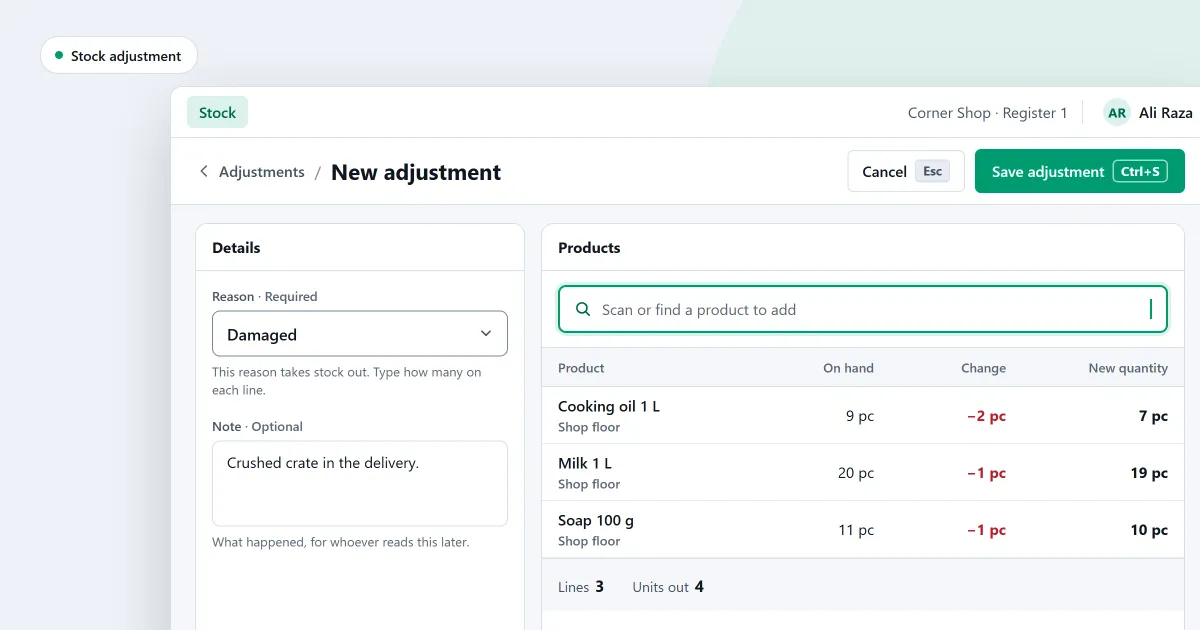
If you search for stock management software free download, you want to know what is on your shelves without a spreadsheet. You also want to try it before you pay. Free stock software can hold only a few items, cannot count the shelf, or make it hard to take your records out again. This post gives you a checklist for any free program. Then it shows where SellyPOS stands.
Here is the honest answer for SellyPOS first. Its free edition, Lite, keeps stock on hand for each product and records every adjustment with a reason. It holds up to 20 products and has no import or export. Stock counts, reorder levels, batches and expiry dates are in Basic and Professional.
Stock management software free download: a checklist
Ask these questions of any free program, not only SellyPOS.
- Does stock change only with a reason? A delivery, a sale, a damaged item and a count all change the figure. Ask how a mistake is put right. A new record that cancels the old one keeps the history. An edited figure hides it.
- Can you count the shelf and apply the difference? Ask whether you can count by scanning, look only at the lines that differ, and apply the difference with a reason. Ask how a sale made during the count is handled.
- Does it warn you before a product runs out? Ask whether each product can have a minimum, and whether the reorder list can go to a supplier.
- Can you check a delivery against the order? A short delivery should be noted, so the rest can be chased. Ask whether it can be recorded on the day it arrives.
- Does it track expiry dates? Food, medicines and cosmetics go off. Ask whether each delivery takes an expiry date, and what happens to stock that has expired.
- Can your list get in, and your records get out? Ask whether it imports a spreadsheet and exports your products and sales. Without that, you may have to type everything again.
- Is there a limit on items? Ask how many products the free version holds. A product list grows.
- Is there a backup? Ask how the data is copied, where the copy goes, and whether you can restore it. A copy on the same disk does not help when that disk fails.
- Does it stay free? Ask whether the free version stays free, and what happens when a trial ends.
If your search was for inventory management software free download, the same questions apply.
Where SellyPOS stands
Each line names the editions that hold it. The stock control page sets out the whole job.
- Reasons and reversals (every edition). Stock on hand is the sum of every stock entry for a product. Each adjustment needs a reason. A mistake is reversed by a new document that names the one it reverses, and the original is never edited.
- Who may change stock (every edition). The shop can set a limit for each role on adjustments, voids and stock counts. Self-approval is off by default. Loss or theft always needs a second person to approve it.
- Stock list and past adjustments (every edition). The stock list shows each product’s quantity, sortable by quantity or value. The Adjustments tab lists past adjustments, newest first.
- Deliveries against an order (every edition). A short delivery leaves the rest of the order to come. A delivery over the ordered amount is accepted up to a set tolerance, and refused beyond it.
- Counting (Basic and Professional). Count by scanning barcodes. Blind counting is the default, so the expected figure is hidden while you count. Sales made during a count are taken off exactly once.
- Reorder levels and the reorder list (Basic and Professional). Set the minimum and reorder point on each product. The list shows low and out-of-stock products. Printed or exported, it is grouped by supplier.
- Expiry dates (Basic and Professional). Expiry tracking is set per product, so food, cosmetics and other goods can carry dates. Expiring and expired stock sit in one list.
- Import, export and backup (Basic and Professional). Import products from a spreadsheet or CSV file, and check the rows before anything is saved. Save a copy of your products as a CSV file. The app can back up once a day to a folder you choose. Restoring shows a preview of what will be lost first.
SellyPOS Lite is free for ever, with no trial and no licence. It holds up to 20 products, shows the last 7 days of sales history and returns, and has no backup, restore, import or export. Basic and Professional each start with a 7-day free trial; after it, they are a one-time payment, and the price is on the pricing page. Moving up keeps your data.
The inventory software for a small shop page covers the whole stock job, and the free POS software for PC page covers Lite’s computer and limits.
Inventory software free download for PC: how to try it
Download SellyPOS from the download page. It installs on Windows 10, version 1809 or later, or on Windows 11, 64-bit. The install guide shows the steps. Setup asks you to sign in with Google.
If you need stock counts, reorder levels or expiry dates, read how to choose an edition first. A shop gets one trial, whichever edition it runs, so decide before you start it.
Next
Read the longer checklist for inventory software and what the free version of POS software leaves out. Then compare prices or download SellyPOS.
Questions people ask
Is SellyPOS Lite really free?
Yes, for ever: no trial, no licence and no lock. Lite holds up to 20 products, shows the last 7 days of sales history and returns, and has no backup, restore, import or export. When you need more, install Basic or Professional over the same data.
Which stock tools are free in SellyPOS Lite?
Lite is free for ever. It keeps stock on hand for each product and records every adjustment with a reason. It holds up to 20 products. It has no stock counts, reorder levels, batches, expiry dates, import or export. Those are in Basic and Professional. See the editions.
How long is the free trial?
Basic and Professional each start with a 7-day free trial. A shop gets one trial, whichever edition it runs. When the trial ends, SellyPOS keeps selling, and the other screens wait until you activate a licence.