POS and accounting software: one program or three?
Should a shop run its counter, stock and books in one program or three? See the daily loop a shop runs, and where one program stops.
Short answer One program or three is a choice between one record for every sale, purchase and payment, and separate tools with more depth in each part. A shop that buys, sells and pays every day gains from one record. SellyPOS is one program for one shop, covering the counter, stock, buying, credit and money accounts. It is not accounting software.
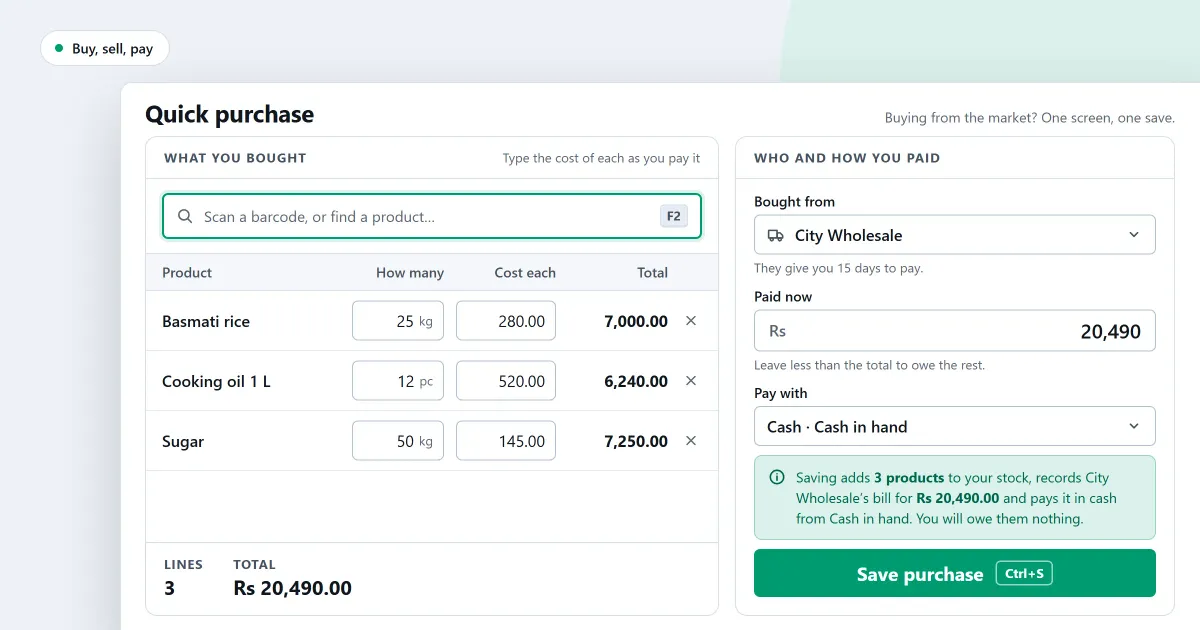
A point of sale (POS) program takes the money at the counter and records each sale. Accounting software keeps the books. Whether POS and accounting software should be one program or three depends on how a shop’s day runs. The day starts with goods arriving at the door and ends with the money in the drawer and the bank.
Should a shop run one program or several?
A shop can run one program for the counter, stock, buying and money, or several programs, each doing one part. One program keeps each sale, purchase and payment in one record, so nothing is typed twice. Several programs can go deeper in one part, but each may hold its own copy of the figures.
What does a shop do in one day?
A shop’s day follows a loop: buy, receive, sell, take back and pay out. Each step changes stock or money, so each one belongs in the same record. The steps below run in order, and a program that covers the whole loop saves a shop from keeping the same facts in two places.
- Order goods from a supplier, so the order is written down before the goods arrive.
- Receive the goods against that order, and record what came in.
- Enter the supplier’s bill against the goods received, and pay the bill when it is due.
- Sell at the counter, which takes each item off the stock on hand.
- Take goods back. The return reason decides whether they are sold again, held or written off.
- Record what the shop paid out, and check what the money side shows. In SellyPOS, expenses are in Basic and Professional.
For example, a supplier sends 50 bottles with a bill of 100. Ten bottles sell at 3 each, so the counter takes 30, and 40 bottles stay on the shelf. A single record shows 100 owed, 30 taken and 40 left, with no figure typed twice.
Two things make the loop hold together. The stock figure must move with every sale and every return, so the shelf and the record agree. The supplier’s bill must match the goods received, so the shop neither pays twice for the same goods nor forgets goods it has already taken in. When the two programs disagree on either point, the shop finds out late, at the counter or at the end of the month.
Where does one program stop?
One program stops where the books go deep. SellyPOS keeps money accounts, expenses, profit and loss, a balance sheet and a cash flow statement in Basic and Professional. It has no chart of accounts you can edit and no journal entries, so an accountant may still keep the books in a tool of their own.
Where SellyPOS stands
SellyPOS is one program for one shop. Several tills on one shop network are in Professional. It covers the counter, stock, buying, credit and money accounts. Each part has its own editions:
- Counter and stock: sales, returns, held sales, stock on hand and adjustments are in Lite, Basic and Professional.
- Buying: purchase orders, goods received, supplier bills, supplier payments and purchase returns are in every edition, Lite included.
- Customers and credit: credit limits, a customer ledger with a running balance and statements are in Basic and Professional.
- Money: the four shipped money accounts are in every edition, Lite included. Expenses, profit and loss, the balance sheet and the cash flow statement are in Basic and Professional.
- Books check: after start-up, restore and sync, the books are checked against customers, suppliers and stock. This is in Basic and Professional.
The limits are plain. The statements cannot be exported or printed, there is no bank reconciliation, and there are no custom accounts or journal entries. In Basic and Professional, reports can be exported as a spreadsheet, CSV or PDF. Lite has no backup, and it holds up to 20 products.
Next
The purchases and suppliers pages follow the buying steps above, one by one. For the stock side of the same question, read ERP vs inventory software. The money and accounts pages set out the books, and the sales counter pages show the counter. For the accounting side on its own, read ERP vs accounting software. See how to record a supplier bill and pay it. Check the prices on the pricing page, then download SellyPOS.
Questions people ask
What can a bill do in SellyPOS, and which edition has it?
Every edition rings up a sale on the Sales screen, takes cash and other payment methods, and prints a receipt on a 58 mm or 80 mm thermal printer. Lite shows the last 7 days of sales history and returns. Basic and Professional add credit sales, customer statements, A4 invoices and backup. See choosing an edition.
Is SellyPOS a cloud service or a browser app?
No, SellyPOS is an installed Windows app, not a browser app, an Android app or a cloud service. It runs on the computer itself and finishes a sale with no internet connection. You need the internet once, to sign in with Google at setup. See an installed Windows app for what that means at the counter.
Can I see whether my shop made a profit this month?
Yes, you can see it: open Financial statements from the Money menu, and the profit and loss for this month appears straight away. Any figure on it can be opened to show the entries behind it. The statements are in Basic and Professional, and they cannot be exported or printed yet. See how to see profit for this month.
Can I see my shop's profit in SellyPOS?
Yes, in Basic and Professional a shop can see its profit. Open Statements and it shows this month's profit and loss, with a comparison against the previous period or the same period last year. Profit is shown only to people with permission to see it, so other staff see sales and expenses only. The statements cannot be exported or printed. See profit and the statements.
How do I keep customer and supplier balances in SellyPOS?
Each customer has a ledger, and each supplier has a statement. A customer's ledger lists every amount owed and paid in date order with a running balance; a correction is added as a new entry, never edited. Owed and owing shows who owes the shop and whom it owes. Customer ledgers and supplier statements are Basic and Professional; supplier payments are in every edition. See customers and credit.
