ERP and inventory management systems: when stock is enough
Stock control is enough when one shop sells from one place. Learn when an ERP is needed, and what SellyPOS keeps for one shop, edition by edition.
Short answer Stock control is enough when a shop needs to know what is on the shelf, what to reorder and what has passed its expiry date. Larger businesses may need warehouse bins, picking or manufacturing, which ERP systems cover. SellyPOS keeps stock for one shop, with counts, reorder levels and expiry in Basic and Professional.
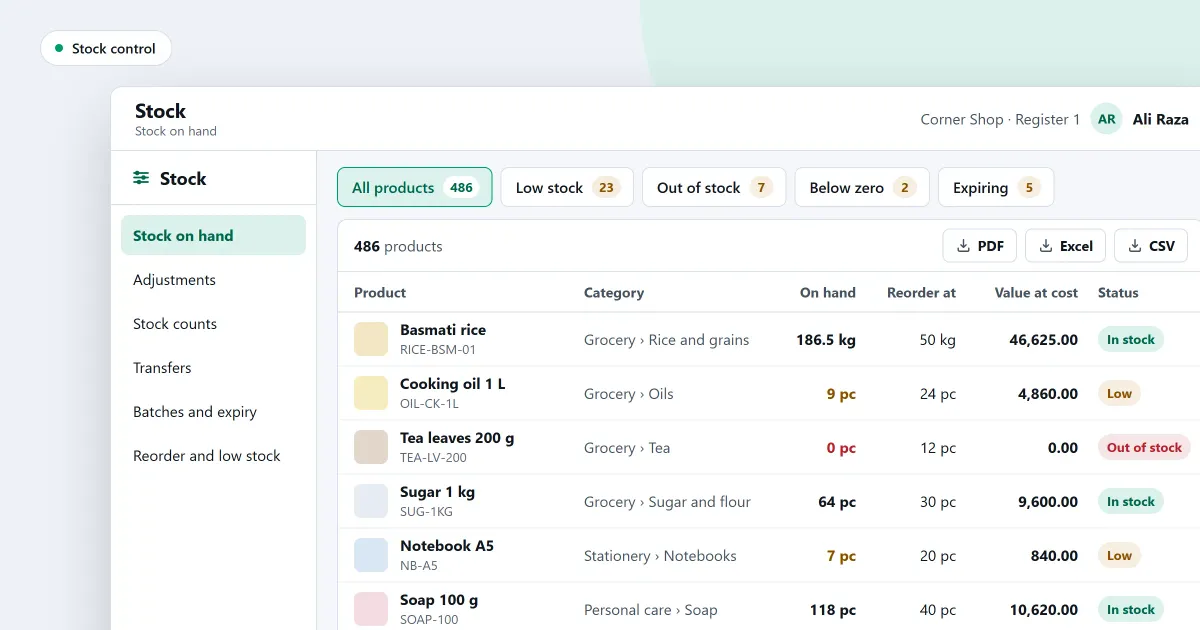
ERP and inventory management systems both keep count of the goods a business holds, but an ERP also runs the rest of the business. This page explains when counting stock on its own is enough for a shop, and when the shop needs more. It also says which stock parts SellyPOS keeps, and in which edition.
Is stock control enough for a shop?
Stock control is enough when a shop sells from one place and needs four answers: what is on the shelf, what has sold, what to reorder and what has expired. A counter shop asks those questions daily. A stock program that answers them does the job the shop needs, without parts of an ERP it will not use.
What should a stock system do for one shop?
A stock system for one shop should record every movement, explain every change, and warn before a shelf runs empty. Each item below is ordinary shop work. None of them needs manufacturing or a warehouse layout, so a counter shop can judge a program by these five jobs.
- Show the stock on hand for every product, built from every stock movement.
- Record each adjustment with a reason, and void a mistake with a new record rather than an edit.
- Count the shelves by scanning, review only the lines that differ, then apply the count.
- Show what is low or out, with a suggested quantity to order.
- Track expiry dates and lot numbers, and offer the earliest batch first at the counter.
For example, the record shows 40 tins of cooking oil and a count finds 36. The difference is 4 tins short. One stock adjustment of minus 4, with a reason, brings the record to 36, and the reason stays on file for later checks.
When does a shop need more than stock control?
A shop needs more than stock control when its goods move through places a single counter cannot follow. Examples are warehouse bins and picking, stock made from parts, and goods held in many branches that one head office must see as one. Those are the jobs ERP systems are built for.
Check whether any of these describe your shop. If none does, stock control in one program is the right size. If one does, you need a larger system, and it is better to know that before you buy.
Where SellyPOS stands
SellyPOS keeps the stock of one shop, or of one shop with several tills on one network. The table shows each stock part and the edition that holds it.
| Stock need | In SellyPOS | Edition |
|---|---|---|
| Stock on hand, from every movement | Yes | Lite, Basic and Professional |
| Adjustments with a reason | Yes | Lite, Basic and Professional |
| Stock counts | Yes | Basic and Professional |
| Reorder levels and a reorder list | Yes | Basic and Professional |
| Expiry dates and lot numbers | Yes | Basic and Professional |
| Stock in more than one place | Yes, locations of one shop only | Professional |
| Warehouse bins and picking | Not included | Not in any edition |
| Manufacturing from parts | Not included | Not in any edition |
A sale past the stock on hand can be allowed, blocked or allowed after an approval prompt, as the shop chooses. A blocked sale says how much stock is available. The shelf count is the sum of every stock entry, so each sale and stock change leaves a record. A mistake is voided by a new document that names the one it reverses.
You set reorder levels yourself. The program does not set them by a rule. Lite holds up to 20 products and has no counts, reorder levels or expiry dates, so a longer list or those tools need Basic or Professional.
Next
Start with how to count your stock, then read how to work out a reorder level for each product. For the money side, read ERP vs accounting software. The stock control pages set out each part, and inventory software for a small shop covers the counter side. Check the prices on the pricing page, then download SellyPOS.
Questions people ask
Which stock tools are free in SellyPOS Lite?
Lite is free for ever. It keeps stock on hand for each product and records every adjustment with a reason. It holds up to 20 products. It has no stock counts, reorder levels, batches, expiry dates, import or export. Those are in Basic and Professional. See the editions.
Can I count my stock by scanning barcodes?
Yes. Stock is counted by scanning each product's barcode and entering its quantity, and the next scan follows, so you never need the mouse to count. Counting on two terminals at once is not built yet. Stock counts are in Basic and Professional, not in Lite. See how to count your stock.
Can I undo a stock adjustment I entered by mistake?
Yes. Void the adjustment with a reason, and SellyPOS records a new document that names the adjustment it reverses. The original adjustment is never edited, so its record stays as it was. Voiding an adjustment is in every edition, Lite included. See adjust stock with a reason.
Does SellyPOS manage a warehouse?
No, SellyPOS does not manage a warehouse. It keeps stock on hand for each product, and in Professional it keeps stock in several locations of one shop, where Damaged and Quarantine are offered as kinds. It has no warehouse bins, picking, put-away or waves, and a location holds only a name, a code, a kind and a flag for whether its stock can be sold. See stock control.
Can SellyPOS track stock in more than one place?
Yes, SellyPOS tracks stock in more than one place in Professional, but only inside one shop. The Locations tab in Settings creates a location with a name, a code, a kind and a sellable flag; Damaged and Quarantine are offered as kinds. You can see each product's stock in each location and in total, and move stock between locations. See stock control.
