Spreadsheet or POS software for keeping stock?
A spreadsheet or POS software for keeping stock? What a sheet does well, where it stops, a table to compare the two, and how to move your product list across.
Short answer A spreadsheet can hold a stock list, but a sale only changes that list when someone types the sale in. In SellyPOS, each sale and stock change leaves a stock entry, and the stock figure is the sum of those entries. Importing a product list from a spreadsheet file is in Basic and Professional.
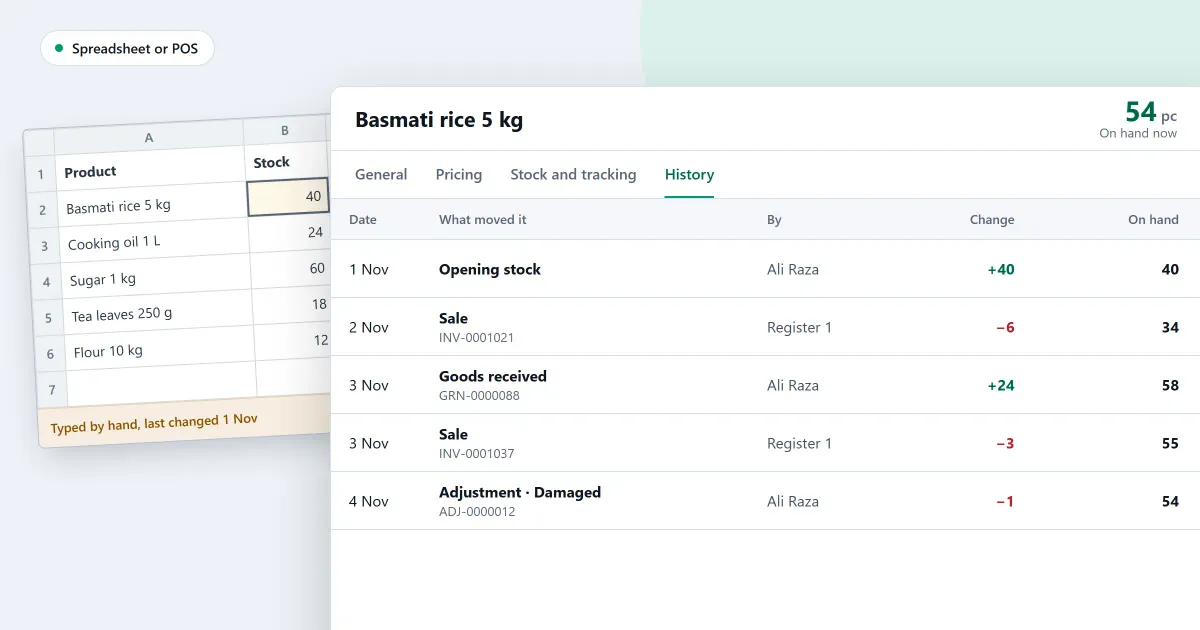
Should a small shop keep its stock in a spreadsheet or in POS software? Both can hold a product list. The difference shows when something sells. This page sets out what a spreadsheet does well, where it stops, a table to compare the two, and how to move a product list across.
Is a spreadsheet enough for keeping stock?
A spreadsheet is enough for a short list that changes rarely. It becomes hard to trust when the same stock changes in many places: sales, returns, deliveries and counts. Each change has to be typed in, and one missed entry leaves the count wrong.
What does a spreadsheet do well?
A spreadsheet does well what it was built for. It sorts a list, adds up a column, prints a page, and lets you read the whole list at once. For a one-off sum, or a list you check by hand, it is the right tool.
What goes wrong when stock lives in a spreadsheet?
Every sale is typed twice: once at the counter or on paper, and once in the sheet. Errors build up, and the count drifts away from the shelf. A plain sheet does not stop a stock figure from going below zero, or a sale from being typed twice.
For example, suppose the sheet misses 4 bags of rice sales a day for 7 days. The sheet then shows 28 more bags than the shelf holds, because 4 times 7 is 28. A recount on the seventh day shows the gap, but the cause is hard to find. These figures are invented for the sum.
Here is the same question asked of each. The cells use plain words.
| Question | A spreadsheet | SellyPOS |
|---|---|---|
| What happens when something sells? | Someone types the sale into the sheet | Each sale leaves a stock entry |
| How is the stock figure worked out? | By a formula you must keep right | The sum of every stock entry for the product |
| How is the count checked against the shelf? | By hand, from a printout | Count by scanning, review the lines that differ, then apply the count |
How do I move my stock list to POS software?
To move a stock list to POS software, keep the old sheet, clean the list, and import a few rows first. Then import the rest. Count the shelves, and compare the count with the program’s figure before you trust it.
- Keep the old sheet. Save a copy of it, and do not delete the original.
- Clean the list. Give each product one row, one name, and one code where it has one. Remove blank rows.
- Import a few rows first. Check the names, prices and units of those rows before you import the rest.
- Count the shelves. Compare the count with the figure the program shows, then apply the difference.
Where SellyPOS stands
Each point below states the edition that holds it.
- Import from a spreadsheet. Products are imported from a spreadsheet workbook or a CSV file in four steps: choose the file, match its columns, check the rows and import. It starts from a downloadable template. An import only adds products. It does not update existing ones, and price lists are not part of it. Basic and Professional.
- More than one sheet. If a workbook has more than one sheet with product columns, they are read together as one list. Older spreadsheet files are not read, and a very large file has not yet been tried. Basic and Professional.
- Changing many prices. Copy a block from a spreadsheet and paste it into the sheet. It fills from the selected cell in the same shape, and a paste never creates a product. Basic and Professional.
- Stock on hand. Stock on hand is the sum of every stock entry recorded for a product, so each sale and stock change leaves a traceable entry. Lite, Basic and Professional.
- Counting. Count products by scanning them, review only the lines that differ, recount them if needed, and apply the count. Once a count is applied, it is read-only. Basic and Professional.
- Counting on paper. Export the count to a spreadsheet, count on paper, then import the filled sheet. Importing the same file twice is one import, so the count is not doubled. Basic and Professional.
- Reports out. Export a report as a spreadsheet, a CSV file or a PDF, and each export is recorded. Basic and Professional.
- Lite. Lite holds up to 20 products and has no import or export, so a list of more products needs Basic or Professional.
The inventory software page and the stock control module set out the whole stock side. The product import section explains the import steps in more detail.
Next
Read moving from a notebook or spreadsheet to POS software for the move itself, and how to count stock in your shop for the count. Check the prices on the pricing page, then download SellyPOS.
Questions people ask
How do I import my products from an Excel file?
The import shows each column of your file on its own row, with up to three examples from its first rows. Choose the product field each column imports as, or Don't import. Recognised columns are already matched. If the workbook has product details on several sheets, they are joined by their column names and read as one list. A row whose name, SKU or main barcode matches a product already in the shop is skipped, and so is a variant of a main product already in the shop. See import products from Excel.
