How to calculate employee commission for shop staff
How to calculate employee commission for shop staff: a percentage or a plain amount, returns, when to pay and an example. Professional only.
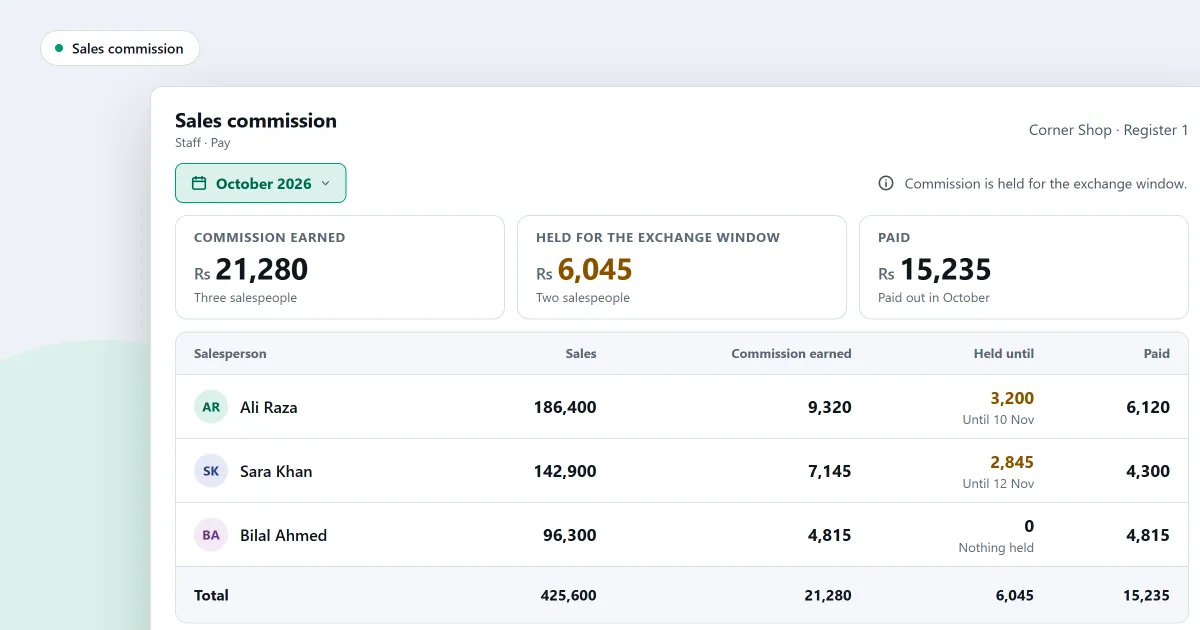
Shop staff who sell often ask how their pay is worked out. Before you pay anyone, decide how to calculate employee commission. Pick one method, write the rule down, and tell your staff what it is. This page sets out the two common methods, the choices a rule must make, a worked example and the mistakes that cause arguments. In SellyPOS, salesperson commission is in Professional only.
Two common ways to pay commission
- A percentage of each sale. The salesperson earns a set share of the value of each sale they make.
- A plain amount per sale. The salesperson earns a fixed amount for each sale, whatever its size.
Either way, write the rule down before the month starts.
Decide what the sale value is
A percentage needs a sale value to work on. Decide what that value is before the first sale of the month. Ask yourself:
- Is it the price before tax, or the price with tax?
- Is it the price after the discount, or before it?
Write the answer down, and check which of these your software uses before you promise a figure to staff.
Decide what happens on returns and exchanges
Goods come back, and some are swapped. Decide in advance what happens to the commission already counted.
- For a full return, does the commission on that sale come back?
- For a part return, does the commission on that part come back?
- For an exchange, is commission paid on the new goods, or only on the difference in price?
Write each answer into the rule. A rule decided in advance is easy to explain. A rule decided after a dispute is hard to defend.
Decide when to pay
Pay commission on a set day, such as the end of the month. Some shops hold commission back for a short time after the sale. A hold gives a return time to come in before the money goes out. Put the day and any hold into the rule. Do not pay commission on a sale that has since been voided.
A worked example
For example, a salesperson makes three sales in one day. Their values are 500, 300 and 200. The shop pays 2 percent of the sale value. The commission is 10 on the first sale, 6 on the second and 4 on the third. The total is 20.
The next day, the customer returns the whole 300 sale. That sale earned 6. If the rule takes commission back on a return, the total falls to 14. If the rule does not, it stays at 20. The rule must say which.
Now take a plain amount of 5 per sale. The same three sales earn 15. If one sale is returned and the rule takes commission back, the total falls to 10.
The numbers are made up to show the sum.
Mistakes that cause arguments
- Changing the base in the middle of a month. Using the price after tax one month and before tax the next.
- Forgetting returns. Commission then gets paid on money the shop gave back.
- Paying before a return can come in. A hold period fixes this.
- No written rule. When nobody can see how a figure was reached, staff doubt it.
- Forgetting a person who has left. Check what the shop still owes them before the final pay.
Where SellyPOS stands
Salesperson commission is in Professional only. It is not in Basic or Lite. The salesperson commission page sets out how it works, and the staff and permissions page covers the staff side.
- Switched on in Setup. A switch in Setup turns commission for salespeople on. A staff member is marked as a salesperson, and earns at the shop’s default rate or at a rate of their own.
- The salesperson for each sale. While a sale is being made, the cashier chooses its salesperson, and the sale is credited to that person. The salesperson is not printed on the receipt. Splitting a sale between two salespeople, a salesperson for each line and a report by salesperson are not built.
- A percentage or a plain amount. A salesperson earns either a percentage of each sale or a plain amount per sale. The shop chooses, for each of the two, whether a return takes that commission back.
- Returns and voids. Commission is recorded with each sale. A void takes back its share in the same step. A return does too when the shop has chosen that, and an exchange credits commission only on the difference.
- Hold, then pay on a payslip. Commission on recent sales is held back for a set number of days. A Commission view shows the date each amount is held until and what is payable now, with a Make payslip action.
- A person who has left. A person who has left is still paid the matured commission the shop owes them. A reversal after their final pay is not recovered.
Before the first payslip, check the figure the Commission view shows against your own sum for the month.
Next
Commission is a cost, so read how to track profit in a shop to see where it belongs in the figures. For what happens to a sale that comes back, see how a return works. Check the prices on the pricing page, then download SellyPOS.
Questions people ask
How do I pay commission to my salespeople?
Commission is paid on a payslip, in Pay. Commission on recent sales is held back for a set number of days. The Commission view shows the date each commission is held until and what is payable now, with a Make payslip action. A salesperson earns either a percentage of each sale or a plain amount per sale. For each of the two, the shop chooses whether a return takes that commission back. A return or a void takes back its share in the same step, and an exchange credits commission only on the difference. See salesperson commission in POS software.