How to open a mobile shop: stock, IMEI and warranty
A checklist for a phone and accessories shop: stock, one record per phone, warranty promises and used phones, and what SellyPOS does for each.
Short answer To open a mobile shop, set up stock by product and colour, keep one record for each phone by its IMEI or serial number, state each warranty clearly, and plan how a trade-in is paid for. SellyPOS records each device by its own code, and it can take an old device in trade in Basic and Professional.
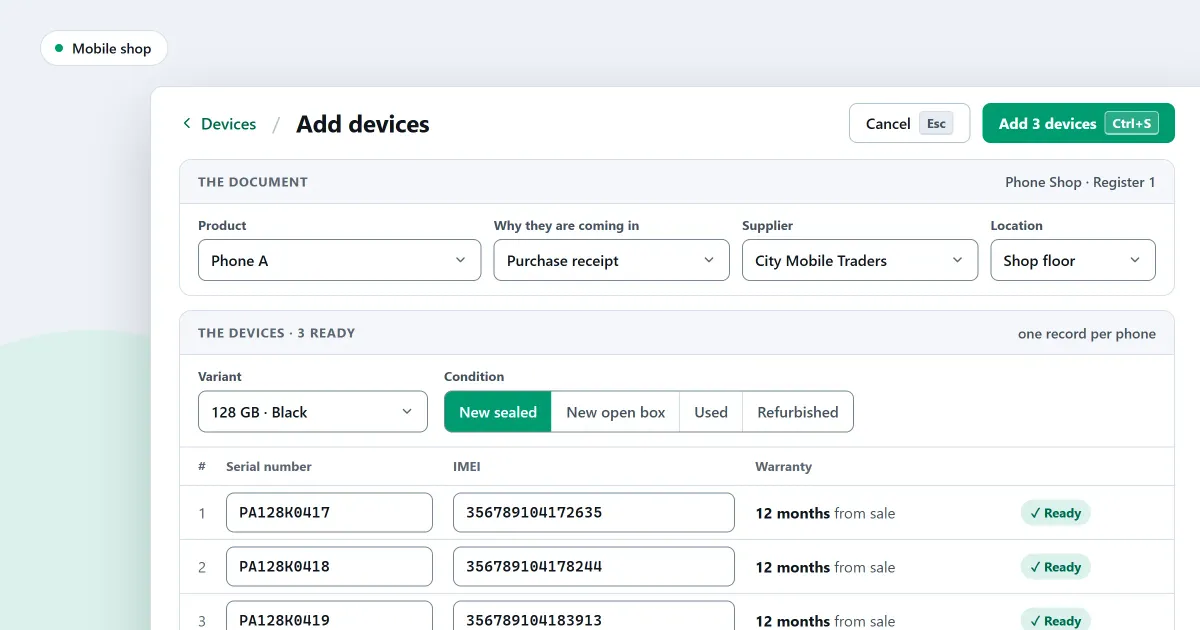
If you want to know how to open a mobile shop business, start with the records. A phone shop runs on a few facts for each phone: which device it is, where it came from, and what is still under warranty. This checklist covers stock, the record for each phone, warranty promises and used phones. The last part says what SellyPOS does, and in which edition.
How do I keep stock for a phone shop?
To keep stock for a phone shop, record each phone when it arrives, with its own code, instead of as one count for its model. Count accessories such as covers by product, since each cover of one kind is the same. Keep the phone’s record until it is sold, returned or written off.
A worked example with invented counts: a shop has 12 phones of one model. It sells 5 and takes 1 in trade. The stock is 12 minus 5 plus 1, which is 8. The phone taken in trade needs its own record, because it has its own code.
What should a mobile shop record for each phone?
Record the phone’s own code, its model and colour, its cost, its price and its warranty. For a phone, the code is its serial number or its IMEI, and a phone with two SIM slots can have two IMEI numbers.
| Record | Why it matters |
|---|---|
| Its own code | Tells one phone from another of the same model |
| Model and colour | Lets the counter find the right phone |
| Cost | Shows what the shop paid for it |
| Price | Shows what the customer pays |
| Warranty | Shows what the shop has promised |
How do I state a warranty for a phone?
Write the warranty on the receipt in plain words: what it covers, from which date, and for how long. Keep the same wording on every sale, so a customer and the shop read the same promise. A warranty that is not written down is hard to check later.
The end date is the sale date plus the length of the warranty. The table has invented dates.
| Phone | Sold on | Warranty length | Warranty ends |
|---|---|---|---|
| Phone A | 1 March | 6 months | 1 September |
| Phone B | 15 June | 12 months | 15 June next year |
How do I handle a used phone or a trade-in?
Write down the used phone’s code, its condition and the value agreed, and check that the code is not already in your stock. A trade-in is a way to pay for a new sale, and the old phone goes into stock at the agreed value. In SellyPOS, a trade-in is one way to pay, in Basic and Professional.
A first-month checklist
- Record every phone by its code. Do this when the phone arrives, before it goes on the counter.
- Write the warranty on each receipt. Use the same words each time.
- Check a used phone’s code before you take it in. Look for it in the stock first.
- Count stock against the records each week. A phone missing from the count needs a reason written beside it.
Where SellyPOS stands
Five device and warranty features are in SellyPOS. Each one names its edition.
- Each phone by its own code. A device is recorded by its own kind of code: a laptop by its serial number, a phone by its serial number and one or two IMEIs, and a router by its MAC address. Several codes can be typed in one box, separated by commas. A shop cannot yet define its own kind of code. Basic and Professional.
- Find a phone by its IMEI or serial number. Scan or type a device’s IMEI or serial number to open its page, which lists each time it came in or went out, newest first. The new or used condition, and whether a device is with a customer, are not shown on this page. Basic and Professional.
- Warranty covers on any product. A product can have one or more warranty covers, each with a name and a length in days, months or years. A cover starts from the sale or from a date, and a product starts with none. A shop-wide default warranty is not built. Lite, Basic and Professional.
- A sold item keeps its warranty end date. Each sale keeps its own copy of the warranty, so changing a cover later does not change the end date on a sold item. The receipt and the invoice show that copy. Lite, Basic and Professional.
- Trade-in as a way to pay. Choose Trade-in on the payment step, scan the old device and fill in one form. The sale keeps its full price, and the shop buys the device into stock at the agreed value. Only phones, tablets and laptops can be taken in trade. Basic and Professional.
The mobile shop software page covers the records side, and the trade-in page covers part payment with an old device. The products and catalogue module and the stock control module hold the settings. For a check of mobile shop software before you buy, read what to check in mobile shop software.
Next
Read how to take a trade-in and how to add a warranty to a product. For the record of each phone in more detail, read how to keep an IMEI register for a mobile shop. Compare the editions on the pricing page, then download SellyPOS.
Questions people ask
Can I track each phone in my shop by its IMEI number?
Yes. Each device is recorded by its own code: a phone by its serial number and one or two IMEI numbers, a laptop by its serial number, and a router by its MAC address. A code belongs to one device only, so the same IMEI cannot be recorded against two phones. The Devices list shows each device's state, and you can filter by state or type, or scan a code to open its page. A device's page lists each time it came into your shop, with the profit on each round for people who may see cost. See mobile shop POS software with IMEI tracking.
How do I sell a used phone at the price I paid for it?
Each device is costed at the cost it came in at, not at the product's average. So a used phone you buy back is sold at what you paid, and a returned or voided device goes back in at the same cost. For each device you record its condition (new sealed, new open box, used or refurbished), its minimum price, its battery, a faults and repairs note, and whether it is carrier locked and whether its locks are cleared. On Quick purchase, scanning a phone's code opens the device panel. A phone that has left your stock earlier is received again as the same device. Each warranty cover is for new devices, used devices or every device, and a used device can carry the end date of its own warranty. See how to track phones by IMEI.
