How to keep an IMEI register for a mobile shop
How a phone shop keeps a record of each phone it buys and sells: the IMEI, the cost, the condition, the warranty and the sale. Plus the weak points of paper.
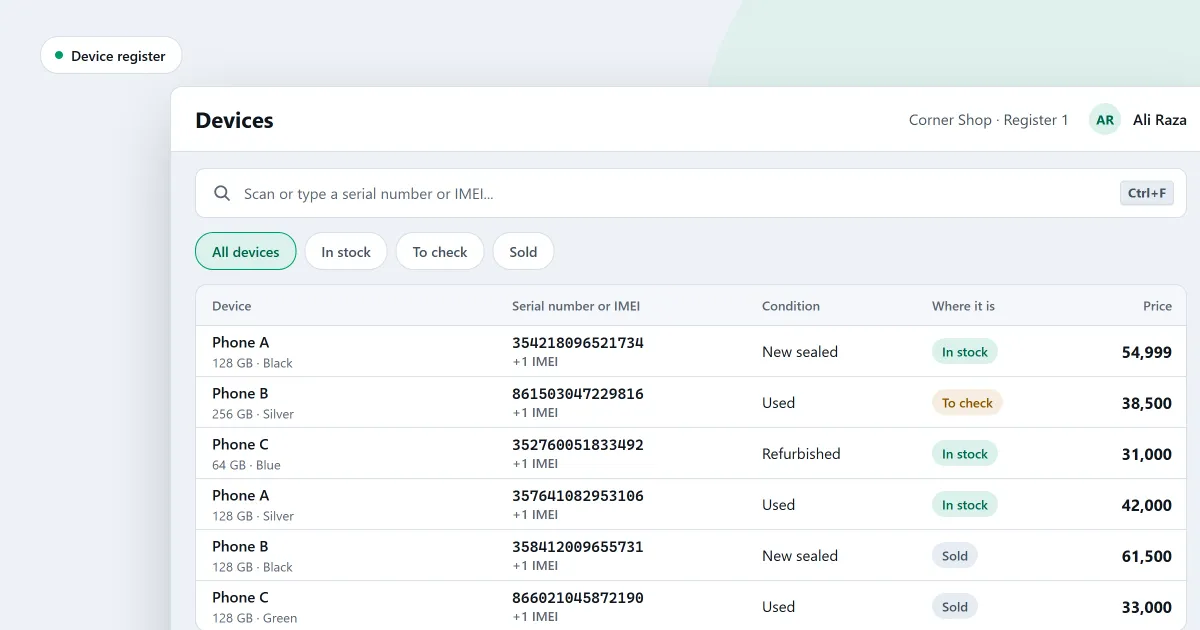
An IMEI register for a mobile shop is a record of every phone you buy and sell, kept by its own code. This guide is for a shop that takes in used phones and sells them on. It is not about tracing a phone that was lost or stolen.
What a register must hold
For each phone, the record needs these facts:
- The code. The IMEI, or the serial number. Some phones have two IMEI numbers, so keep both.
- Where it came from. The supplier, or the customer who sold it to you, and the date.
- The cost. What you paid for this phone, not the average for the model.
- The condition. New, used or refurbished, and any faults you found.
- The checks. Whether the phone is locked to a carrier, and whether its locks were removed.
- The warranty. What it covers, and until when.
- Where it is now. In stock, waiting for a check, with a supplier, sold or written off.
- The sale. The date, the receipt number, the customer and the price.
Where a paper book or spreadsheet goes wrong
A paper book or a spreadsheet can hold all of these facts. Its weak points are the same every time.
- Typing errors. One wrong digit in an IMEI makes the record useless when the phone comes back.
- The same phone twice. A phone that returns in part payment is written again as a new line, and the first line stays.
- No link to the sale. The book says a phone was sold, but not on which receipt. You cannot check the price or the warranty from it.
- Cost and sale kept apart. The cost is in one book and the sale in another, so nobody sees what was earned on that phone.
- Easy to change after the fact. A line can be rubbed out or retyped, and nobody can tell that it was changed.
Checks you can make by hand
If you keep a book, these habits keep it honest.
- When a phone arrives, read its code twice, and compare the two readings.
- Before you write a code, search the book for it. If it is already there, the phone is not new.
- When you sell a phone, write the receipt number beside its code.
- Count the phones on the shelf against the book from time to time.
These habits help, but they depend on a person doing each step every time.
Where SellyPOS stands
Device tracking is in Professional only. Lite and Basic do not record phones by their codes. In Professional, the register is kept by the software:
- Each device has its own code. A phone is recorded by its serial number and one or two IMEIs. One code belongs to one device, so the same IMEI cannot be a second phone.
- A code already in stock is flagged. It is shown as a conflict beside the line, not written a second time. A device that has left and comes back shows its history first.
- Each device is costed at its own cost. A phone bought back is sold at what was paid for it, not at the product’s average.
- Each device keeps its condition and checks. The record holds its condition, its battery, a faults and repairs note, and whether it is carrier locked and whether its locks are cleared.
- The Devices list shows the state. Each device is In stock, To check, With supplier, Sold or Written off. You can filter by state, or scan a code to open its page.
- The history stays. A device’s page lists each time it was in the shop. A past event is never edited.
- Sell by scanning the code. Scan the IMEI or serial number, and the phone goes into the cart at its own price. The receipt prints its codes and warranty.
- Warranty for each device. A cover is for new devices, used devices or every device. A sold phone keeps its own warranty end date.
- Returns by code. A return asks for one of the codes the phone was sold under. A different phone is refused.
- Trade-in. A customer’s old phone can be part of the payment. See trade-in old phones and how to take a trade-in.
The full feature list is on mobile shop software with IMEI tracking.
Next
See how a sale is completed. Then download SellyPOS or compare prices and editions.
Questions people ask
Can I track each phone in my shop by its IMEI number?
Yes. Each device is recorded by its own code: a phone by its serial number and one or two IMEI numbers, a laptop by its serial number, and a router by its MAC address. A code belongs to one device only, so the same IMEI cannot be recorded against two phones. The Devices list shows each device's state, and you can filter by state or type, or scan a code to open its page. A device's page lists each time it came into your shop, with the profit on each round for people who may see cost. See mobile shop POS software with IMEI tracking.
How do I sell a used phone at the price I paid for it?
Each device is costed at the cost it came in at, not at the product's average. So a used phone you buy back is sold at what you paid, and a returned or voided device goes back in at the same cost. For each device you record its condition (new sealed, new open box, used or refurbished), its minimum price, its battery, a faults and repairs note, and whether it is carrier locked and whether its locks are cleared. On Quick purchase, scanning a phone's code opens the device panel. A phone that has left your stock earlier is received again as the same device. Each warranty cover is for new devices, used devices or every device, and a used device can carry the end date of its own warranty. See how to track phones by IMEI.