An end-of-day checklist for a small shop
A plain end-of-day checklist for a small shop: held sales, the day's sales, cash against the sales, returns, low stock and the backup, with an example.
Short answer An end-of-day checklist for a shop is a short list you go through before closing: held sales, the day's sales, cash against the sales, returns, low stock and the backup. Do the same steps in the same order each day, and write down any difference you cannot explain.
What should a shop check before it closes for the day? Most daily mistakes are small and easy to miss: a sale left on hold, a return not written down, a shelf that ran out. A short checklist, used every day, catches them while they are still small. The steps below are general. The last part says where SellyPOS shows each one.
What should I check before I close the shop?
Check held sales first, then the day’s sales and returns, then the cash in the drawer against the sales, then low stock for the next order, and finally the backup. Each step becomes a habit once it is done the same way each day.
- Held sales. Look for any sale left on hold. Recall it and finish it, or discard it, so none is forgotten.
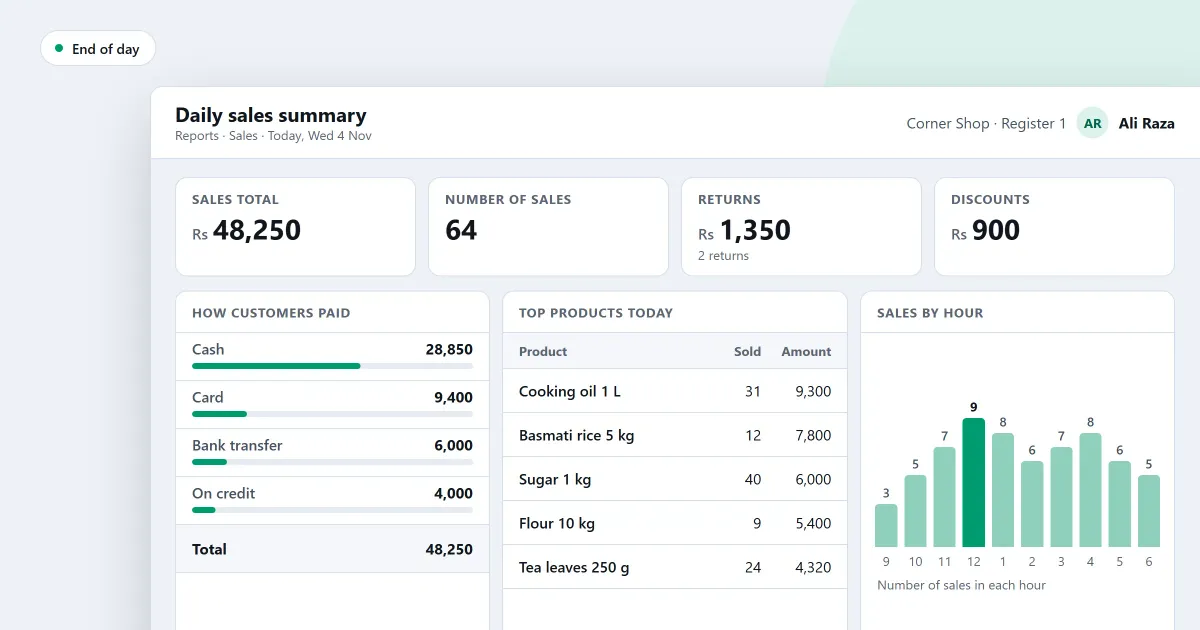
- The day’s sales. Read the day’s sales, returns, net and how each sale was paid.
- Cash against the sales. Count the cash in the drawer, and compare it with what the day’s cash sales say it should hold.
- Returns. Check that each return has its reason and its refund written down.
- Low stock. Note the products that need ordering, so the next order is ready.
- The backup. Make the day’s backup, and check that it finished.
For example, suppose the drawer held 100 at the start of the day, and the day’s cash sales came to 500, with no cash returns. The drawer should hold 600. If the count is 590, the drawer is 10 short. Write that difference down with the date, and look for its cause the next morning.
Who should do the end-of-day checks?
The person who closes the till should do the checks, and the owner or a manager should read the day’s summary before the next opening. Keep the checks on one sheet, so they are done in the same order each time.
What do I do with a difference I cannot explain?
Write it down with the date, the amount and the step where you found it. Do not change a finished sale to make the numbers match. Look for the cause the next morning, and fix the habit that let it happen, such as a missed return.
Where SellyPOS stands
- Held sales. Each held sale has its own discard button, so one can be thrown away without the rest. Clear all asks for confirmation before any held sale is discarded, but it takes all held sales together, not a chosen few. Lite, Basic and Professional.
- Find a held sale. The held sales list is searchable by name or customer. Choose a held sale from it to bring its basket back to the counter. Lite, Basic and Professional.
- The day’s sales summary. It shows the sales, items, gross, discounts, returns and net for the day, and the split by payment method. It has a date filter only, and no export. Basic and Professional.
- Cash, bank and wallet balances. It shows each cash, bank and wallet account at the start, the money in, the money out and the balance now. Money moved between your own accounts is not income or spending, and the page says so. A cash report is not built yet. Basic and Professional.
- Past returns. Search past returns with several filters at once, and open any return to see it read-only, with its stock disposition, settlement and the balance of the original sale. Lite, Basic and Professional.
- Low stock. The reorder page lists products that are low or out of stock, with their minimum, reorder point and a suggested quantity. Basic and Professional.
- The backup. Back up now, or let the shop back up every day to a folder you choose. Basic and Professional.
Lite shows the last 7 days of sales history and returns, and it has no backup. The counter is on the held sales page. The reports are on the reports and alerts module. The low stock list is on the stock control module. The backup is on the speed and reliability module.
Next
Read how to hold a sale and recall it later and how to see today’s sales at a glance. For the profit side of the same day, read how to track profit in a shop. Compare the editions on the pricing page, then download SellyPOS.
