What is a SKU, and does a small shop need one?
In retail, a SKU is the shop's own code for one product. Learn how it differs from a barcode, when sizes need their own, and how SellyPOS uses it.
Short answer A SKU, or stock keeping unit, is a code you make up to identify one product in your shop. It is short, and no two products should share one. Your SKU is for your own records, so it does not have to match the code on the wrapper.
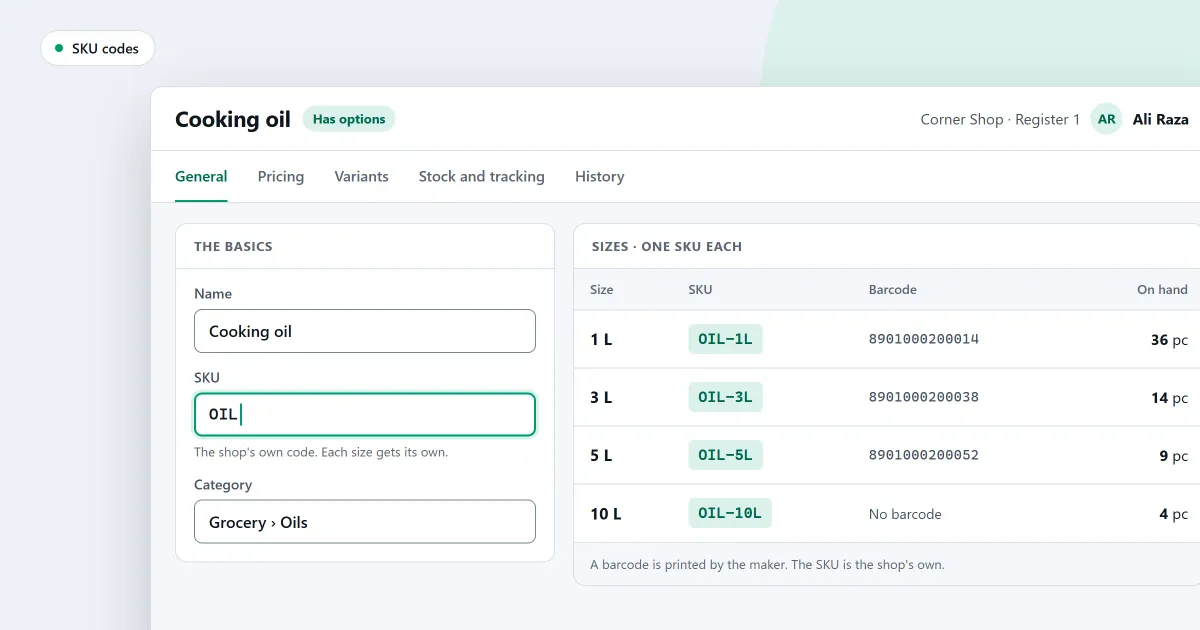
What is a SKU in retail, and do you need one for every product? A SKU is a short code of your own. This page compares it with a barcode and a product name, shows when sizes and colours need their own code, and explains how to keep the scheme simple. The last part covers what SellyPOS does with it.
What is a SKU?
A SKU, or stock keeping unit, is a code you make up to identify one product in your shop. It is short, and no two products should share one. Your SKU is for your own records, so it does not have to match the code on the wrapper.
You decide the code, write it on your list, and use it on shelf labels and price cards. A SKU can be letters, numbers or both, such as a short word for the product followed by a letter.
What is the difference between a SKU, a barcode and a product name?
A product name says what the item is, for people. A barcode is printed and scanned, and it is often made by the maker. A SKU is your own code, used in your records and your searches. One product usually has one name, one SKU and one barcode, but they do different jobs.
| Code or name | Who makes it | What it is for |
|---|---|---|
| Product name | You, or the maker | What people say and read |
| Barcode | The maker, or the shop | What the scanner reads |
| SKU | You | Your own records and searches |
A barcode can change when a supplier changes its packaging. Your SKU does not change with the packaging, so it can stay the same while the wrapper changes.
Does a small shop need a SKU for every product?
Not always. A shop that sells only goods with a printed barcode may find the barcode is enough. A SKU helps most when goods have no barcode, when the shop packs or weighs its own goods, or when one product comes in several sizes and colours that each need their own count.
When do sizes and colours need their own SKU?
When you count, order or sell each size and colour separately, each one needs its own code. A shirt in three sizes and two colours has six separate stock lines, so it needs six codes. Each variant keeps its own code, and the product keeps one name.
Work it out with round numbers. Three sizes, small, medium and large, times two colours, red and blue, makes six combinations. Each combination gets its own code, such as SHIRT-RED-S for a small red shirt, and the same pattern gives the other five. Three sizes times two colours is six codes, all under one product name.
How do you keep a SKU scheme simple?
Pick one pattern, write it down and keep to it. Never give a code to a second product, even after the first stops selling. Leave prices and dates out of the code, so a price change does not change the code. The point of a SKU is that it stays the same.
- Use capital letters and no spaces, so the code is easy to type.
- Put the parts in one order every time, such as the product type, then the colour, then the size.
Where SellyPOS stands
SellyPOS keeps a SKU for each variant, and a code typed in the one entry field finds the product. Sizes and colours are in Basic and Professional. Lite handles a product with only a name, price and unit.
- A SKU and barcodes for each variant. Each variant keeps its own SKU, barcodes, cost, price and stock, and adding a value creates only the new variants. Basic and Professional. The variant list is not grouped by product yet, and prices for each price list are not built for variants.
- One product in many sizes and colours. Attributes such as size and colour are kept once and reused across products. Every combination of the chosen values is created, except the ones excluded before creation. Basic and Professional.
- Change each variant’s code in one grid. Open a product’s variants in one editable table and change the price, cost, SKU and reorder levels of each. Basic and Professional.
- Pick the variant at the counter. Type the name of a product with variants and the counter asks which one you mean. A scanned variant barcode goes straight to its own variant. Basic and Professional.
- One field for scans, codes and names. An exact barcode, SKU or code adds the product at once, and anything else opens a search list. Lite, Basic and Professional.
- Add a product with only a name, price and unit. Only those three are required, and other details are optional. Lite, Basic and Professional.
The sizes and colours section and the clothing shop page show the variant side. Read how to set up sizes and colours for a product for the steps, and the products and catalogue module for the rest.
Next
Write your code scheme on one page before you add the next product. Read what is a barcode and how a shop uses one, then how to add a product. See the pricing page, and download SellyPOS to try it.
Questions people ask
Do I have to add every size of a shirt one at a time?
No. On purchase orders, goods received, quick purchase and stock adjustments, picking a product with variants adds a line for each active variant, with no quantity. Picking one variant adds only that one. Stock that sits on no variant can be given to the variants in the Distribute stock window, or adjusted out with an ordinary stock adjustment. A size label prints only the short code of the size, such as M or XL. You choose which attribute a size design reads, so a shirt design and a shoe design can differ. Choose garments or shoes as your business type at setup, or later in Setup, and the variant options are created for you. See POS software for clothing stores.
How do I import my products from an Excel file?
The import shows each column of your file on its own row, with up to three examples from its first rows. Choose the product field each column imports as, or Don't import. Recognised columns are already matched. If the workbook has product details on several sheets, they are joined by their column names and read as one list. A row whose name, SKU or main barcode matches a product already in the shop is skipped, and so is a variant of a main product already in the shop. See import products from Excel.
