How to run a sale or promotion in your shop
How to run a discount promotion in a shop: pick the products and the discount, protect the profit on each item, tell customers and check the result.
Short answer To run a promotion in a shop, pick the products, choose the discount and the dates, check that each item still earns you enough, and tell the customers. In SellyPOS, a promotion is set up with a name, a percentage or amount, the dates and the products, in Professional.
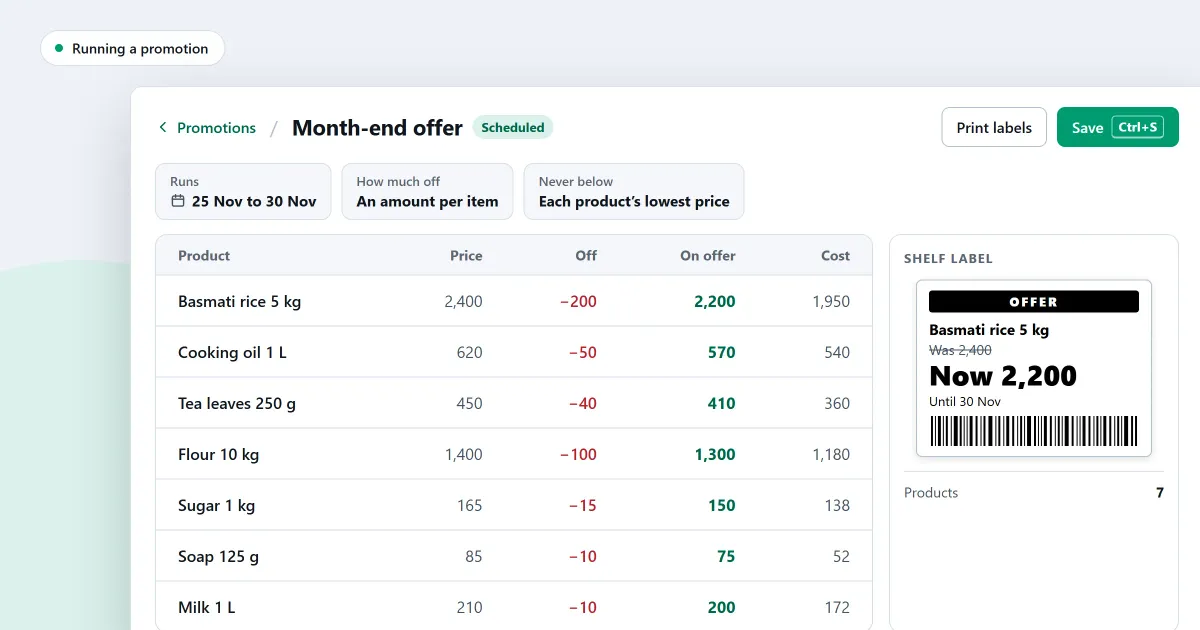
How do you run a discount promotion in a shop without giving away the profit? A promotion planned on paper is easier to keep to. The steps below cover the choice of products and discount, the cost to your profit, the notice to customers and the check afterwards. The last part shows what SellyPOS does at each step.
How do I pick the products and the discount?
Pick products that sell steadily, or products you want to move, and set a discount you can afford on each one. Choose a percentage for a whole group of items, and an amount when the price needs a fixed cut. Keep the promotion to a few days, so you can see its effect before the regular price returns.
Work an example with round numbers. An item costs you 80 and sells for 100, so it earns 20 on each sale. A 10 percent promotion takes 10 off the price, so the item sells for 90. It now earns 10, which is half of what it earned before. If that is too little, choose a smaller discount or leave the item out.
Should I tell customers about a promotion?
Yes. Put a label on the shelf that shows the regular price, the promotion price and the end date, and say the same at the counter. A customer who can see the regular price and the new one knows what the saving is.
How do I check whether the promotion worked?
Compare the sales of the promoted items with the same days before the promotion began. Check the profit on each item and the number of items sold, not just the total. A total can look good while the profit on each item falls, so both numbers matter. If the promotion sells well but the profit on each item falls further than you planned, choose a smaller discount next time. Write down the decision and the figures behind it, so the next promotion starts from them.
Where SellyPOS stands
- Create a promotion in three steps. Enter a name, a percentage or amount off and the start and end days, then choose the products. The review shows a summary and any conflict, and you save it as a draft or activate it. Activation is refused where a product already has a promotion on the same day. Professional.
- The larger discount wins on each line. On each line the larger of the promotion, a manual discount or a customer group discount is used, and a tie keeps the promotion. The cart line says why a manual discount won. Stacking between promotions and priorities between promotions are not built. Professional.
- Never below the minimum. A promotion never takes a product’s price below its minimum selling price, however large its percentage or amount off. Professional.
- Shown on the sale and the receipt. The cart line names the promotion, and the totals and the receipt show the discount it took off. A return gives back its share in proportion. Professional.
- A promotion label. A promotion label shows the regular price struck out, the promotion price, the percentage off and the end date, with the product’s normal barcode. Printing these labels on paper is still to be confirmed. Professional.
- Discounts at the counter in every edition. A discount can be typed for one line, or for the whole bill, which is spread across the lines. A product marked as not discountable is refused, and the screen says why. Lite, Basic and Professional.
Promotions are set up in the discount promotions page, and the counter is on the sales counter module. For the step by step, read how to set up a discount promotion and how to give a discount.
Next
For the price side of a promotion, read how to set selling prices for your products. Compare the editions on the pricing page, then download SellyPOS.
Questions people ask
How do I run a discount on some products for a week?
Give the promotion a name, a percentage or an amount off, and a start and end day. Then choose the products. The review shows a summary and any conflict, and you save the promotion as a draft or activate it. Activation is refused where a product already has a promotion on the same day. On those days the discount applies by itself when a cashier scans or adds one of the products, and it works offline. On each line, the larger of the promotion, a manual discount or a customer group discount is used, and a tie keeps the promotion. A promotion never takes a price below the product's minimum selling price. See discount promotions.
