How to check IMEI in Pakistan before you buy a phone
How to check IMEI in Pakistan before you buy or take in a phone: find the code, check it with PTA and read the reply, in plain steps.
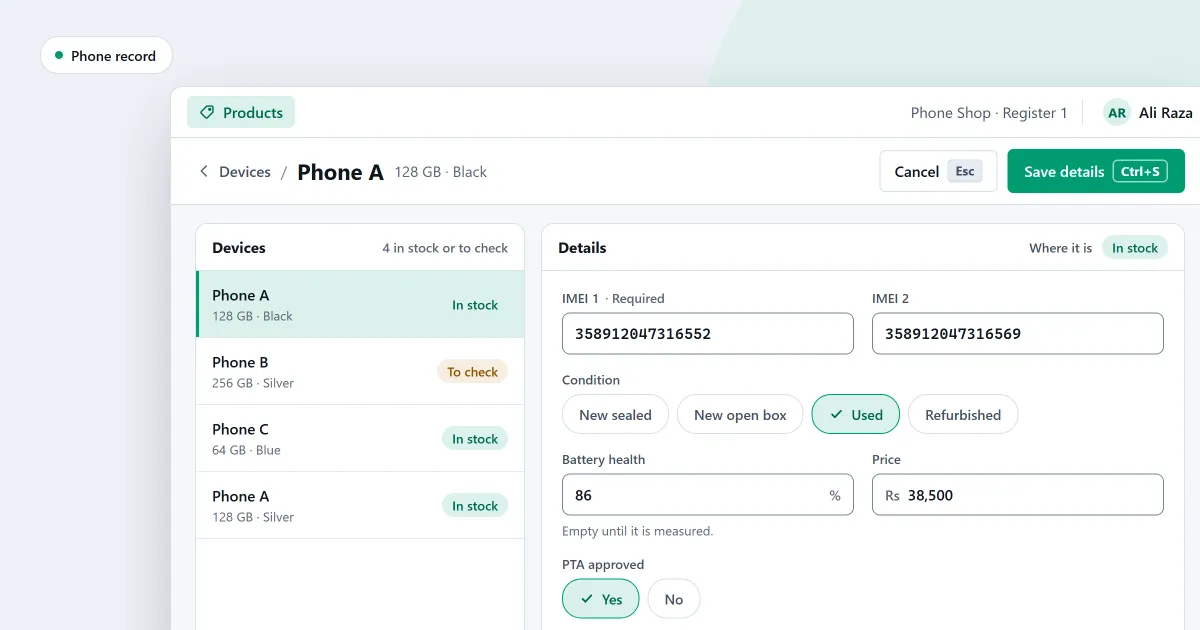
How to check IMEI in Pakistan is the question to ask before you buy a used phone, or before you take one in as part of a sale. The check has a few steps, and this guide sets them out in plain words. It is for a phone you are about to buy or take in. It does not cover finding a phone that is lost or stolen.
Find the IMEI on the phone
An IMEI number check starts with the code on the phone itself. Dial *#06# on the phone’s dial pad. The phone shows its IMEI on the screen. You can also find it:
- on the phone’s box
- under Settings, then About phone
- on older phones, under the back cover or the battery
A phone with two SIM slots, or with an eSIM, can show more than one IMEI. PTA says to check each IMEI shown, and to make sure the IMEIs belong to the same device.
For example, a cashier takes the phone from the customer, dials the code and writes down each IMEI before any money changes hands.
Check a phone’s PTA status
PTA is the Pakistan Telecommunication Authority. It gives three ways to check a phone’s status:
- Send the 15-digit IMEI as a text message to 8484.
- Use PTA’s website.
- Use PTA’s app.
Send each IMEI on its own. The website and the app are described in PTA’s published FAQ. PTA can change its pages, so check PTA’s current page before you rely on the steps in this guide.
What the reply means
These are PTA’s replies in plain words. A reply shows the status of the IMEI at that moment.
- Compliant. PTA has approved or registered the IMEI.
- GSMA valid, not registered by PTA. The IMEI is valid, but PTA has not approved or registered it. It must be registered.
- Non-compliant. The phone does not meet PTA’s conditions, for example because its IMEI is not a valid standard number. PTA says such a phone will be blocked on a Pakistani mobile network.
- Blocked. The IMEI has been reported to PTA as stolen, lost or misused.
- Fraudulent activity. The IMEI has been reported or identified under fraudulent activity. It may be blocked.
PTA’s advice to buyers is to check each IMEI shown on the phone, send each one to 8484 or use PTA’s website or app, and make sure the phone shows as registered. Read every reply before you decide.
If you buy and sell phones
PTA’s advice has one more step. When a phone shows as registered under an individual’s identity, ask the seller for the record of customs duty paid. PTA advises a copy of the duty slip for that phone. PTA also states that buying or selling a phone registered under an individual’s identity is at the buyer’s and seller’s own risk.
Keep a record of every IMEI you buy and sell, with the date and the other party. For the facts a record should hold, read how to keep an IMEI register for a mobile shop.
Where SellyPOS stands
In SellyPOS, recording a phone by its codes is in Professional only. It works like this:
- Each phone has its own codes. A phone is recorded by its serial number and one or two IMEIs. The device type decides which codes are asked, and a phone needs at least one.
- A code belongs to one device. The same IMEI cannot also be another device’s serial number. A code already in stock is flagged as a conflict beside the line.
- Each phone keeps its condition and checks. The record holds its condition, its battery, a faults and repairs note, and yes or no boxes for carrier lock and locks cleared. In Pakistan, it also has a yes or no for PTA approved.
- The cart shows the facts. The cart line shows the phone’s code, condition, approval status and the end date of each warranty cover.
- Sell by scanning the code. Scan the IMEI or serial number in the main entry box, and the phone goes into the cart at its own price.
- Returns by code. A return asks for one of the codes the phone was sold under. A different phone is refused.
- Find a phone by its code. Scan or type an IMEI or serial number to open the phone’s page. The Devices list shows each device’s state, and you can filter by state.
SellyPOS records these codes and facts. It does not check a phone with PTA, and it says nothing about a phone’s status. Use PTA’s own service, as set out above, to check the status. The full list is on the mobile shop POS page. A customer’s old phone can also be part of the payment for a sale. See trade-in old phones and how to take a trade-in.
Next
Read the checklist for choosing mobile shop software. See how a sale is completed. Compare prices and editions, or download SellyPOS.
Questions people ask
Can I track each phone in my shop by its IMEI number?
Yes. Each device is recorded by its own code: a phone by its serial number and one or two IMEI numbers, a laptop by its serial number, and a router by its MAC address. A code belongs to one device only, so the same IMEI cannot be recorded against two phones. The Devices list shows each device's state, and you can filter by state or type, or scan a code to open its page. A device's page lists each time it came into your shop, with the profit on each round for people who may see cost. See mobile shop POS software with IMEI tracking.
How do I sell a used phone at the price I paid for it?
Each device is costed at the cost it came in at, not at the product's average. So a used phone you buy back is sold at what you paid, and a returned or voided device goes back in at the same cost. For each device you record its condition (new sealed, new open box, used or refurbished), its minimum price, its battery, a faults and repairs note, and whether it is carrier locked and whether its locks are cleared. On Quick purchase, scanning a phone's code opens the device panel. A phone that has left your stock earlier is received again as the same device. Each warranty cover is for new devices, used devices or every device, and a used device can carry the end date of its own warranty. See how to track phones by IMEI.