What is a batch or lot number in a shop?
A batch or lot number marks goods made or received together. Learn why a shop records it, how it differs from an expiry date, and when you can skip it.
Short answer A batch or lot number is a code that marks a group of goods made or received together. A shop records it to trace those goods later, for example when a product must be recalled. A shop that does not need to trace goods can keep only the expiry date.
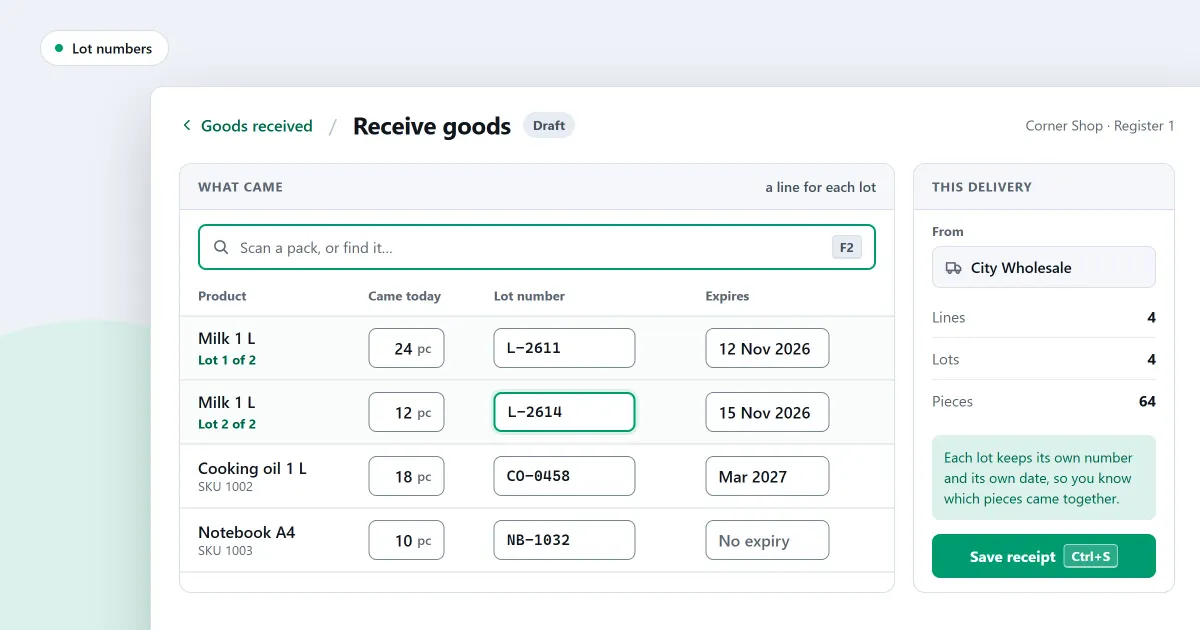
What is a batch number, and does your shop need one? A batch number, also called a lot number, is a code for goods that were made or received together. Many shops never use one. Others need it to check expiry dates, to find goods again after a fault, or to answer a question about one packet. This page explains the two ideas and when each one matters.
What is a batch or lot number?
A batch number is a code that the maker or packer prints on goods made in one run. Some shops also write their own lot number when goods arrive, so that one group can be followed. Batch and lot mean the same idea in practice: one code for one group of goods.
The code is only useful if it is written on your record, next to the quantity and the arrival date.
Why does a shop record a batch number?
Keeping a batch number lets a shop follow one group of goods. There are three common reasons: to follow expiry dates, to find the goods again if a fault is found, and to show where a group went after it left the store room. A shop without these needs can skip it.
- Expiry dates. Two groups of one product can have different dates. The number tells you which date belongs to which goods.
- A fault. If a fault is reported in one group, the number shows which goods to pull from the shelf, and the rest can stay on sale.
- Tracing. The number lets you see where a group went, from the store room to the shelf and on to the customer.
How is a batch number different from an expiry date?
A batch number says which group goods came from. An expiry date says when they stop being fit to sell. The two often come together, but they answer different questions. A shop can track one, both, or neither, depending on the goods.
For example, a shop receives 12 packets with batch B-14 and 8 packets with batch B-15, all expiring in the same month. The expiry month cannot say which packets came from which group. The batch number can. If group B-14 is reported faulty, you pull those 12 packets and leave the 8 on sale.
When does a shop not need a batch number?
A shop that sells goods with no expiry date, and has no need to trace them, does not need a batch number. Keep the number only where it helps you act, such as a date check or a recall. A batch number is worth adding for goods that expire or that could need a recall.
Ask one question about each product group: if something went wrong, would you need to know which group it came from? If the answer is yes, record the number. If the answer is no, the expiry date, or nothing at all, may be enough.
How do you record a batch number when goods arrive?
Write the batch number and the expiry date on the goods record when they arrive, before the goods go on the shelf. Use the same number on every packet from that group. If the packet has no batch number, write the expiry date alone and keep the supplier’s bill with the record.
Where SellyPOS stands
SellyPOS records a batch number and an expiry date on stock that tracks them. It can show the lot number on receipts and labels, and it can trace a lot number. These features are in Basic and Professional, not in Lite. Each item below names its edition.
- Expiry and lot on a delivery (Basic and Professional). For a product that tracks expiry and lots, each delivered line takes its own expiry date and lot number. Batch numbers are not generated for you.
- Expiry without a batch number (Basic and Professional). A delivery can carry an expiry date with no batch number. The earliest-expiring stock is selected first, and an expired product is blocked.
- Lot number on the receipt and labels (Basic and Professional). When the shop switches it on in Settings, a receipt shows the lot number of the batch a sale came from. The Labels screen has a consignment picker for choosing the batch on a label. Choosing a label template can turn the lot number off on labels while its switch still reads on.
- Trace a lot number (Basic and Professional). Type a lot number to open its trace, with sections for where the lot came from, where it went, what remains and the overrides made on it. The part showing where a lot came from is empty for every shop until batches can be created. The trace takes only a lot number, with no location or date filter and no export.
- Trace one batch from its supplier (Basic and Professional). A batch trace shows its supplier and expiry, where its stock went, what remains at each location, and any overrides.
For the labels side, see how to print barcode labels. For the expiry side in more depth, see expiry date tracking software for shops. The stock control module sets out the rest of the stock side.
Next
Read FIFO and FEFO: which should a shop use? to choose the order in which stock leaves. Then read how to receive goods against an order, so the batch number is recorded when goods arrive. Check the prices on the pricing page, then download SellyPOS.
