FIFO and FEFO: which should a shop use?
FIFO sells the oldest stock first and FEFO sells the stock that expires first. Learn which goods need which rule, and how SellyPOS applies it.
Short answer FIFO and FEFO are two ways to choose which stock leaves the shelf first. FIFO sells the oldest stock first. FEFO sells the stock with the earliest expiry date first. Goods that have expiry dates should usually go out by FEFO, and goods that do not expire can use FIFO.
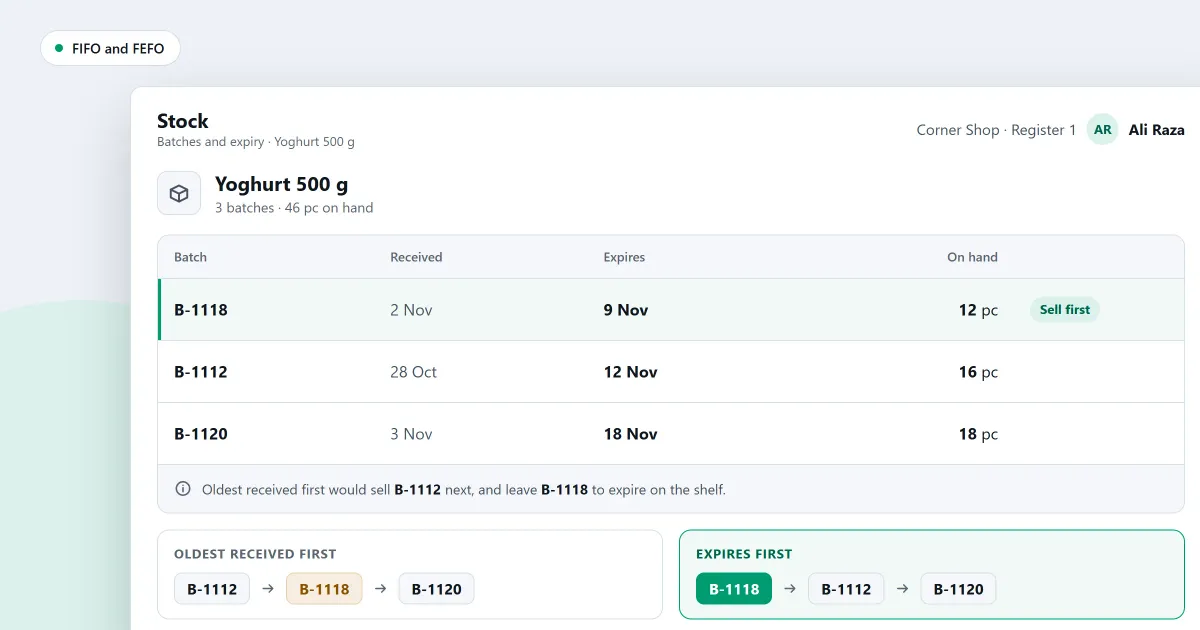
Which stock should leave your shop first: the oldest, or the one that expires first? The answer decides how you pick goods from the shelf and the store room. This page explains FIFO and FEFO, which goods need each one, and how a shop applies them at the shelf and at the counter.
What is FIFO?
FIFO stands for first in, first out. The stock that came into the shop first is the stock that goes out first. It keeps old goods moving, and it stops the newest goods from pushing the older ones to the back. It suits goods that do not spoil, such as hardware and household goods.
FIFO is a rule about order, not about dates printed on packets. It works on the day each item arrived. A shop that keeps goods for a long time, without any expiry date, uses it to make sure nothing is forgotten at the back of a shelf.
What is FEFO, and when does a shop need it?
FEFO stands for first expired, first out. The stock with the earliest expiry date leaves first, even if it arrived later than other stock. Use it for food, medicine, cosmetics and anything else with a date printed on the packet, because a product past its date should not be sold.
FEFO and FIFO can give different answers. Say a shop has two batches of one biscuit. The first arrived in May and expires in August. The second arrived in June and expires in July. FIFO picks the May batch. FEFO picks the June batch, because it expires first. Only FEFO keeps the goods that will go off soonest moving.
Which goods need which rule?
Use FEFO for goods that have an expiry date, such as food, medicine and cosmetics. Use FIFO for goods that have no expiry date and that spoil slowly or not at all, such as hardware and stationery. A shop with both kinds of goods can use both rules, one for each kind.
- Goods with a printed expiry date: use FEFO, and check the dates each week.
- Goods with a batch number but no expiry date: use FIFO, so the oldest batch leaves first.
- Goods that do not spoil: FIFO keeps the stock turning over without any date checks.
How do you apply FIFO or FEFO at the shelf and the counter?
Apply the rule at the shelf and the counter by putting the stock that leaves first at the front. For expiry-dated goods, that is the earliest expiry. When you restock, move the older packets forward. At the counter, sell the stock that expires first, and pick a later batch only when you have a reason.
The shelf rule guides the person who restocks. The counter rule guides the cashier who has a choice between two batches. Both come down to one habit: the goods that will go off first should be the ones that leave first.
Where SellyPOS stands
SellyPOS offers the earliest-expiring batch at the counter, records any pick of a later batch, and lists expiring stock. These features are in Basic and Professional, not in Lite. Each item below names its edition.
- The counter offers the earliest expiry first (Basic and Professional). When a batch-tracked product is added at the counter, it offers the batches with the earliest expiry first, each with its expiry and available quantity.
- A later batch needs permission (Basic and Professional). Picking a batch other than the one expiring first needs the override permission. The record keeps the batch chosen, the batch the counter suggested and both expiry dates. A pick of a later-expiring batch records no reason.
- Write off expiring stock, earliest first (Basic and Professional). A write-off with no batch chosen takes the stock that expires first, spread across several deliveries if needed.
- Expiring and expired stock in one list (Basic and Professional). The Batches and expiry page lists stock that is expiring or has expired, by expiry date or by batch. Write off an expired row to move it into an adjustment for that batch. The window for stock about to expire cannot be set by the shop yet.
- Expiry date with no batch number (Basic and Professional). A delivery can carry an expiry date with no batch number. The earliest-expiring stock is selected first, and an expired product is blocked.
For the expiry side in more depth, see expiry date tracking software for shops. Shops that sell medicine can also read the pharmacy software page.
Next
To keep the batch record right, read what a batch or lot number is in a shop. Then read how to check expiring and expired stock in SellyPOS. Check the prices on the pricing page, then download SellyPOS.
Questions people ask
How does SellyPOS handle MRP and expiry dates for medicines?
No price can go above the product's MRP, and no setting or approval allows it. A typed price above the MRP is refused. A receipt shows the MRP and the amount saved below it, and the total You saved counts it once. The saving is only shown and is never booked. Expiry dates can be typed as month and year. Expired stock is refused at the counter or warned, depending on the product's expiry policy. Selling an expired batch needs a reason from the shop's own list, and a cashier without the permission needs a supervisor's approval. A medicine's generic name, strength, dosage form and storage conditions can be recorded. They are asked for, never required. See pharmacy POS software.
