Invoice format for a small shop: what to include
An invoice format for a small shop: the lines to include, a sample layout and a worked bill as tables, A4 or a receipt roll, and how SellyPOS prints.
Short answer An invoice format for a small shop is the set of lines a bill to a customer carries: the shop's details, a number, the date, the customer, each item with its quantity and price, and the totals. This page gives a sample layout as a table, explains A4 against a receipt roll, and says what SellyPOS prints.
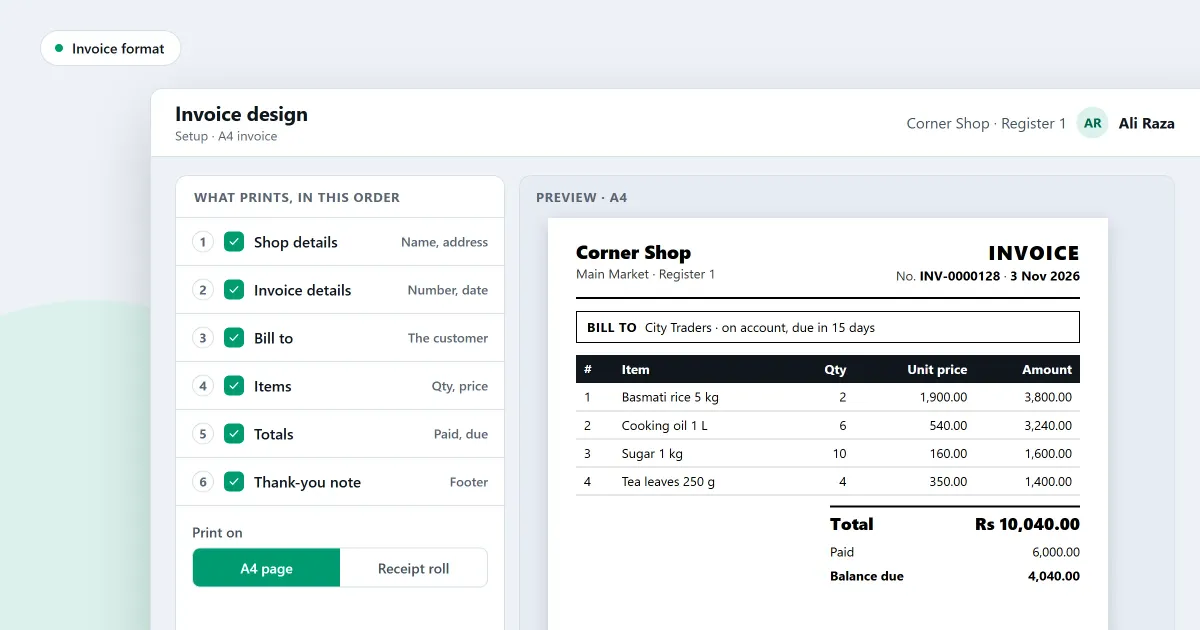
A bill with no number, no date or no customer name is hard to find later. An invoice format fixes the lines, so every bill looks the same and carries what you need when you need it. Below is a sample layout, a worked bill with invented goods, and a note on paper size. The last part says what SellyPOS prints.
What lines should an invoice have?
An invoice should show who sold the goods, a number and a date, who bought them, each item with its quantity, unit price and line amount, and the total to pay. Add how the customer paid, and any note the shop needs. Keep the same lines on every invoice, so any bill can be read at a glance.
| Part | What goes there | Example |
|---|---|---|
| Shop | Name, address and phone number | Shop name, street, phone number |
| Number | A number that is never used twice | INV-0045 |
| Date | The day of the sale | 4 November 2026 |
| Customer | Name and phone number, or a walk-in customer | Walk-in customer |
| Items | Item, quantity, unit price and line amount | See the worked bill below |
| Totals | Subtotal, any discount, and the total to pay | See the worked bill below |
| Payment | How the customer paid | Cash |
How do you work out an invoice total?
Multiply the quantity by the unit price for each line, add the line amounts for the subtotal, then take off any discount to reach the total to pay. Write each step on the bill, so the customer and the shop can check the same figures.
| Item | Quantity | Unit price | Line amount |
|---|---|---|---|
| Cooking oil, 1 litre | 2 | 400 | 800 |
| Rice, 5 kg bag | 1 | 1,500 | 1,500 |
| Tea, 250 g pack | 3 | 150 | 450 |
| Subtotal | 2,750 | ||
| Discount | 250 | ||
| Total to pay | 2,500 |
The tea line is 3 packs at 150, which is 450. The three lines add up to 2,750. A discount of 250 leaves 2,500 to pay.
Which paper should you print an invoice on?
Use A4 for an invoice that needs a full page, and a receipt roll for the record of a finished sale at the counter. An A4 invoice has room for every line and the customer’s details. A receipt is short. Choose the paper by what the customer needs to keep.
| A4 invoice | Receipt on a roll | |
|---|---|---|
| Paper | A4 sheet | Narrow roll |
| Length | A full page | Short |
| Main use | A full bill the customer keeps | The record of a finished sale |
How do you number invoices?
Give each invoice its own number from one series, in order. Never use a number twice, even after a sale is voided. A prefix and the year make a bill easy to find later. A gap in the series should have a written reason beside it.
Where SellyPOS stands
Lite includes the amount in words and the shop logo on receipts. The A4 invoice and the numbering rules are in Basic and Professional.
- A4 invoice printing page. The page shows the one A4 invoice the shop prints, what it carries and a first-page preview of a made-up sale. A sample opens marked SAMPLE, and the folder invoices are saved in is set here. A phone’s codes and warranty are printed on its line of the A4 invoice. Basic and Professional.
- Print an invoice, or send it on WhatsApp. After a sale, the completion step can print a full-page invoice, or open WhatsApp on a number you pick with the invoice as a PDF or JPG. The invoice is a sales invoice, except that for a shop set up in the UAE a finished sale is headed Tax Invoice once the shop has typed its TRN. Basic and Professional.
- Document numbers in your own pattern. Each document type has its own number series, with a prefix, a suffix, a zero-padded length, a start and an increment. The branch, register, year, month or day can be put into the number. Basic and Professional.
- Numbers are never reused. A number is never used twice, even after a Void. A gap in a series is allowed and can be reported with a reason. Basic and Professional.
- Amount in words. The sale receipt and its reprint can carry a line that spells the amount in words, and a setting turns it on or off. Other documents are not included. Lite, Basic and Professional.
- Shop logo on receipts. Choose the logo on the Shop tab, see how it will print, and it is drawn on the receipts. Lite, Basic and Professional.
The A4 page is set out in how to print an A4 invoice, and the receipt layout in how to customise a receipt. The invoice tools are on the setup and documents module and the billing software page for a small shop.
Next
For the difference between a receipt, an invoice and a bill, read receipt, invoice and bill: what is the difference?. See receipt and invoice printing software for shops for the printing side. Compare the editions on the pricing page, or download SellyPOS.
Questions people ask
Can I edit a sale after it is finished?
A finished sale is never edited in place, but it can be corrected. A manager or owner chooses Correct this sale, which reopens it in the cart, and finishing replaces the original with the corrected sale. You can also make a return or an exchange against it. Either way the records show what happened and when.
