Receipt, invoice and bill: what is the difference?
A receipt proves a payment, a bill shows what a customer owes, and an invoice asks for payment. Learn which paper to give and what SellyPOS prints.
Short answer A receipt, a bill and an invoice are three papers with different jobs. A receipt is proof that money was paid for a sale. A bill is a list of what a customer owes. An invoice is a request for payment that sets out the goods and the total. Many shops use bill and invoice for the same paper.
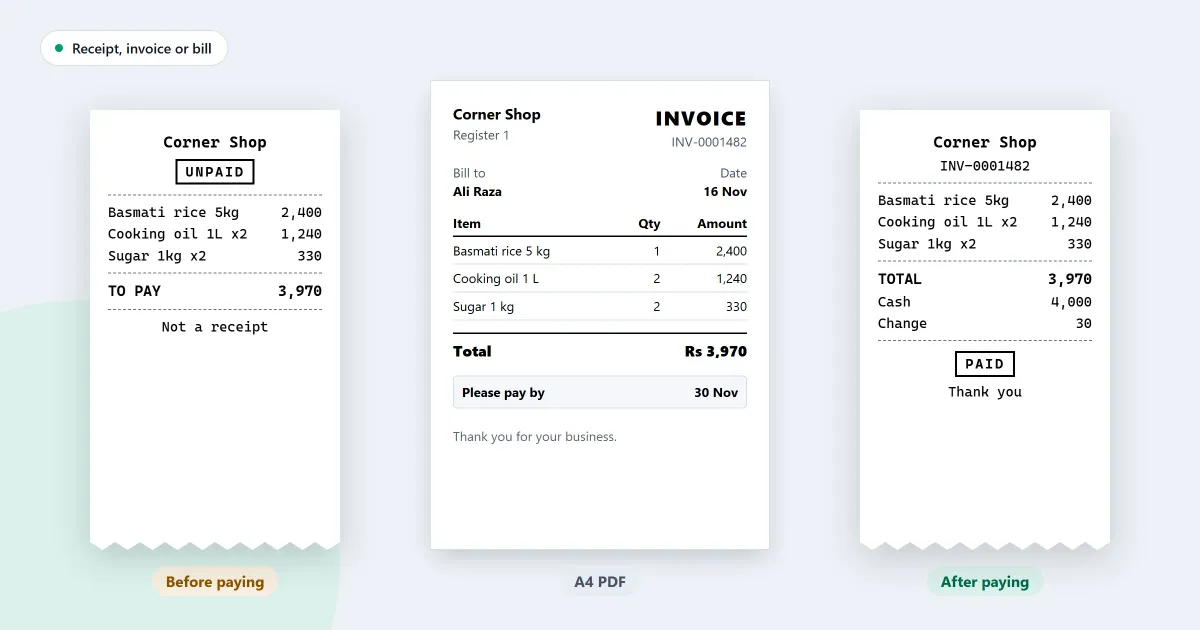
The difference between a receipt and an invoice is who needs the paper, and when. A customer usually needs a receipt. A bill or an invoice is for when the sale is large, or when the money is still owed. This page sets out each paper, which one to give, and what SellyPOS prints.
What is a receipt?
A receipt is the paper a customer gets when a sale is paid. It shows the items, the amount and how the sale was paid. The customer keeps it as proof, and the shop keeps a record of the same sale. Receipts are usually narrow and printed on a roll.
A receipt is given at the end of a paid sale. It does not ask for money. It shows that the money has already changed hands.
What is a bill?
A bill is a list of goods and the amount a customer owes for them. Shops often give a bill before a sale is paid, for example when the customer wants to check the total first or will pay later. A bill is not proof of payment. Once the amount is paid, a receipt is given.
A customer who buys on credit owes the amount on the bill until it is paid.
What is an invoice?
An invoice is a request for payment that lists the goods, the amount and the date the money is due. It is often used for a larger sale, or for a customer who pays later. It is usually a full page, and the shop keeps a copy.
An invoice carries more detail than a receipt. Keep the copy with your records.
Which paper goes to whom, and when?
Give a receipt at every paid sale. Give a bill when the customer needs the total before paying, or will pay later. Give an invoice for a larger sale, or when a full-page record is needed. Keep a copy of each for your own books.
| Paper | What it does | Usually given | Who keeps it |
|---|---|---|---|
| Receipt | Proves a payment | At the end of a paid sale | The customer keeps it, and the shop keeps a copy |
| Bill | Lists what is owed | Before payment, or when the customer pays later | Both keep a copy |
| Invoice | Asks for payment by a date | For a larger sale, or a sale paid later | Both keep a copy |
Check the heading before you hand over the paper. A receipt says the sale is paid, and a bill says it is not.
Do you need an invoice for every sale?
No. A shop that sells across the counter for cash usually needs only a receipt. An invoice is useful for a customer who asks for one, for a sale that is paid later, or for a business buyer who keeps papers for its own books. Ask the customer what they need before you print.
What paper size do you need?
Receipts usually print on a narrow roll, from a small thermal printer. An invoice or a bill for a full page prints on A4 paper, from a normal printer. Pick the printer for each job. Many counters keep both, so each paper is ready when a customer asks for it.
Where SellyPOS stands
SellyPOS prints a receipt when a sale is finished, and offers a full-page invoice or an unpaid bill from the counter. Receipts are in Lite, Basic and Professional. The invoice page, the invoice option and the unpaid bill are in Basic and Professional. The receipt printing page sets out the printer side, and the receipt and invoice printing page sets out the paper side.
- A receipt at the end of a sale. When a sale is finished, the completion step offers Print receipt. If no printer is attached, the row says No printer attached and cannot be used. Lite, Basic and Professional.
- Receipt printers of 58 mm and 80 mm. Receipts print on thermal receipt printers that are 58 mm or 80 mm wide. Serial printers are not supported yet. Lite, Basic and Professional.
- An unpaid bill, without selling. Press Ctrl+End to print the cart as a bill marked UNPAID. Nothing is sold, and the cart is left as it was. The bill is not saved or numbered. Basic and Professional.
- A4 invoice page. The page shows the one A4 invoice the shop prints, what it carries and a first-page preview of a made-up sale. Basic and Professional.
- An invoice printed or sent on WhatsApp. After a sale, the completion step can print a full-page invoice, or open WhatsApp on a number you pick with the invoice as a PDF or JPG. Basic and Professional.
For the steps, read how to print an A4 invoice or send it on WhatsApp and how to print an unpaid bill for a customer.
Next
Decide which paper each customer needs before you print. Then read POS software vs billing software vs inventory software to see how the three jobs differ in a program. See the prices on the pricing page, and download SellyPOS.
Questions people ask
Do I need a receipt printer or a barcode scanner?
No. Without a barcode scanner, you find products by typing their name or code, and receipt printing can be turned off when no printer is connected. When you add a receipt printer, SellyPOS works with 58 mm and 80 mm thermal printers over USB or Bluetooth. Hardware it works with.
What can a bill do in SellyPOS, and which edition has it?
Every edition rings up a sale on the Sales screen, takes cash and other payment methods, and prints a receipt on a 58 mm or 80 mm thermal printer. Lite shows the last 7 days of sales history and returns. Basic and Professional add credit sales, customer statements, A4 invoices and backup. See choosing an edition.
