How to open a cosmetics shop: shades, sizes and stock
How to open a cosmetics shop: plan colours and sizes, dated stock, promotions and the display, then see where SellyPOS stands for each part.
Short answer To open a cosmetics shop, plan the shades and sizes you stock, the expiry dates on each product, the promotions you run and the display at the counter. Give each colour or size its own record, keep dated stock, and check what is near its date each week. SellyPOS keeps variants and expiry dates in Basic and Professional.
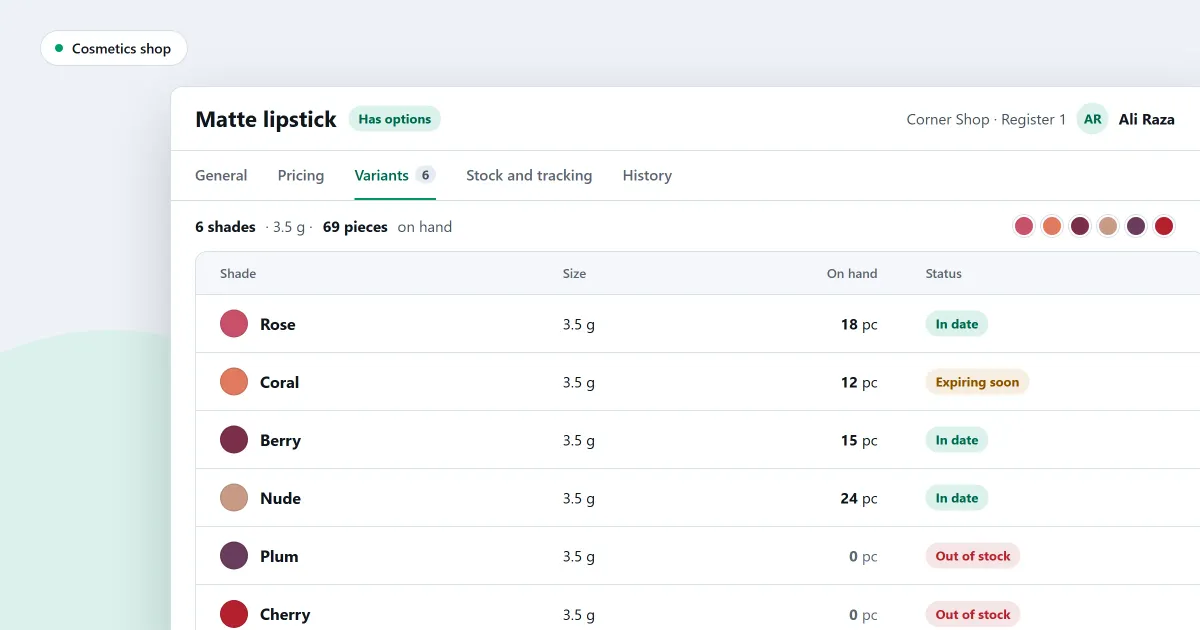
How do you open a cosmetics shop where a customer may ask for one colour in one size, and then ask about another? Cosmetics come in many versions of one product, some carry dates, and promotions change the shelf every few weeks. This checklist covers the choices to make before the first day. The last part shows where SellyPOS stands for each one, and which edition holds it.
What should a cosmetics shop set up first?
Before a cosmetics shop opens, set up each product with its colours or sizes, whether it tracks expiry, and its prices. Sort the range into categories and brands, so the shelves are easy to find. Add promotions last, once the range is right, so that a promotion is not built on a product you later change.
- Ranges. List the lines you stock, such as skin care, hair care, make-up and fragrance.
- Variants. For each product, list its colours or sizes by name, so every version has its own line.
- Dates. Mark which lines carry an expiry date, and which do not.
- Categories and brands. Group lines by category and brand, so the sales figures later show what sells.
- Promotions. Plan any sale for some lines over a few days, and write down the days.
- Display. Put the best sellers at eye level, and keep the testers within easy reach of the counter.
How do I keep dated stock in a cosmetics shop?
To keep dated stock, record the expiry date for each product that carries one, and check those dates every week. Put the earliest-dated stock at the front, and move near-dated lines onto a promotion before they expire, not after. Write down any stock you remove from sale, and why.
Here is a worked example with invented figures. A shop receives 12 jars of one face cream with an expiry date in March. In the first week it sells 4 jars, so 8 are left. A week before the date, the 8 jars go on promotion.
| Point in time | Jars | Figure |
|---|---|---|
| Delivery received | 12 | 12 in stock |
| First week sold | 4 | 8 in stock |
| A week before the date | 8 | 8 to move onto a promotion |
Is a promotion worth running on a slow line?
A promotion is worth running when a line is not selling and its date is coming. Give it a name, a percentage or an amount off, and a start and an end day. Choose only the products it covers, and check the summary before you activate it, so the discount reaches the right shelf and no other.
Where SellyPOS stands
- Variants as a grid. A product’s variants can be shown as a grid of size against colour, with the stock of each variant. Each variant keeps its own barcode, price and stock. Basic and Professional. See how to set up sizes and colours for a product and the sizes and colours section.
- Expiry for any product. Expiry is set per product, so cosmetics can carry expiry dates as well as medicines. Each category sets whether its products track expiry, and a new product takes that default. Basic and Professional.
- Expiring soon. The report lists products that expire in the next 30 days, with the days left, the value at cost, the day received and the supplier. Basic and Professional. For the full check, read how to check expiring and expired stock.
- Promotions. You enter a name, a percentage or amount off, and the start and end days, then choose the products. The review shows a summary and any conflict, and you save a draft or activate it. Activation is refused where a product already has a promotion on the same day. Professional only. The discount promotions page explains the rest.
- Discount at the counter. When a cashier scans or adds a product on promotion, the promotion applies by itself, and it works offline. Professional only.
- Categories and brands on one page. The categories show as a two-level tree and the brands as a list, and each product count opens its products. Lite, Basic and Professional.
- Sales by category and brand. The report shows the sales for each category or brand before returns. Basic and Professional.
The cosmetics and beauty shop POS software page gives the detail for each part. Lite holds up to 20 products and has no expiry dates or promotions, so a cosmetics shop with a wider range needs Basic or Professional. Compare the editions on the pricing page.
Next
Read how to set up sizes and colours for a product and how to check expiring and expired stock. For the wider stock question, read inventory software for a small shop, what to look for. Then download SellyPOS and try it on your own range.
Questions people ask
How do I run a discount on some products for a week?
Give the promotion a name, a percentage or an amount off, and a start and end day. Then choose the products. The review shows a summary and any conflict, and you save the promotion as a draft or activate it. Activation is refused where a product already has a promotion on the same day. On those days the discount applies by itself when a cashier scans or adds one of the products, and it works offline. On each line, the larger of the promotion, a manual discount or a customer group discount is used, and a tie keeps the promotion. A promotion never takes a price below the product's minimum selling price. See discount promotions.
How do I set SellyPOS up for my kind of shop?
At setup, choose your kind of shop from the tiles. The choice sets sensible defaults for the shop and decides which fields a new product shows. Choose your country from a list you can type to filter, and the currency, formats and time zone are filled in for you. You can change the business type later in Settings. To confirm, you type the word CHANGE, and the screen names what the new type changed. Settings you changed yourself are left alone. See POS software for your kind of shop.
