How to manage supplier payments on time
How to know what you owe each supplier, pay the oldest bills first, and handle part payments and advances, with a checklist and a worked example.
Short answer To manage supplier payments, write down what you owe each supplier, the date each bill is due and what you have paid. Pay the oldest bill first, record every payment against the bill it settles, and check a due list before each payment run.
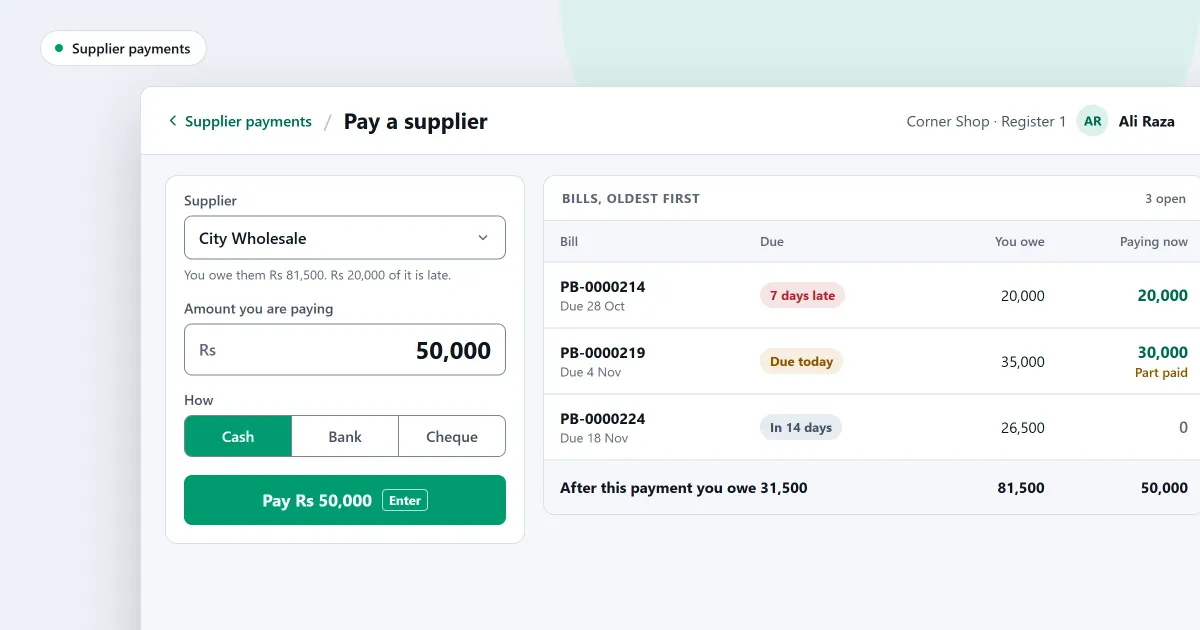
How do you manage supplier payments so that no bill is missed? A missed due date usually means the list of bills was out of date. The habit is simple: know what you owe, know when each bill falls due, and pay in a set order. This page sets out that habit, then shows what SellyPOS does with it.
How do I know what I owe each supplier?
To know what you owe each supplier, keep one list with a line for every bill. Note the supplier, the bill date, the due date, the amount and what you have paid so far. Add up each supplier’s open lines once a week, so the total is never a guess.
A notebook is enough for a few suppliers. A spreadsheet suits more. Either way, the list is only useful if you update it on the day a bill arrives or a payment goes out.
For example, say one supplier sends you two bills. The first is 500, and you have paid 200 of it, so 300 is still open. The second is 400, with nothing paid. You owe that supplier 700 in total, and the two due dates tell you which bill to pay first.
In what order should I pay supplier bills?
Pay the oldest open bill first, unless the supplier has agreed another order with you. Paying oldest first keeps each supplier’s account in order and shows which bills are late. When the money you have is less than the total, the oldest bills are paid first and the rest waits for the next payment run.
A simple weekly routine:
- Sort the open bills by due date.
- Mark the bills falling due before the next payment run.
- Work out how much cash you can spare for suppliers.
- Pay the oldest bills first, and record each payment against the bill it settles.
- Tell a supplier before a bill will be late, not after.
What do I do with a part payment or an advance?
A part payment is an amount smaller than the bill. Record it against that bill, and the bill stays open for the balance. An advance is money you pay before any bill has come in. Keep it as credit with that supplier, and use it against their next bill.
Write a part payment down on the day you make it. Do not wait for the next bill to remind you. An advance needs the same care, because a shop that forgets an advance may pay the same amount twice. The same idea applies when a supplier holds your money, for example after goods were sent back. Keep that credit on the supplier’s account too.
Where SellyPOS stands
SellyPOS keeps supplier bills, payments and advances in one place, and it shows what is due. Each part below states its edition.
- A list of bills and what is late. The bills list filters by supplier, status and date range. A payables ageing groups what the shop owes by how late each amount is. There is no printable ageing or supplier statement. Lite, Basic and Professional.
- A payment-due list. It shows the supplier bills that are due or overdue, with each supplier’s contact details, for planning a payment run. Lite, Basic and Professional.
- A payment spread across bills. Record a payment to a supplier and it is spread across their open bills, oldest first. You can change the split by hand. Post-dated cheques are not recorded. Lite, Basic and Professional.
- Advances. A payment with no bill to set it against becomes a supplier balance in the shop’s favour. It is used against the supplier’s future bills. Lite, Basic and Professional.
- Credit the supplier holds. When a supplier holds the shop’s money, the pay dialog offers to use it, and it clears the oldest bills first. A payment cannot be undone while a later credit use stands. Lite, Basic and Professional.
- The supplier’s balance in words. The supplier’s page says whether the shop owes them or they owe the shop, and by how much. Late amounts are shown beside it. Basic and Professional.
- Who you owe. The list shows each supplier you owe, by how long it has been owed, and a row opens that supplier’s statement. Only people allowed to see supplier balances can see it. Basic and Professional.
The buying side is set out on the supplier and purchase order software page and on the purchases and suppliers module. To see which edition holds each part, read how to choose an edition.
Next
Keep the list current from the first day, and record each bill and payment as it happens. Read how to record a supplier bill and pay it and how to add a supplier. For the same problem on the customer side, read how to collect money from customers who owe you. Compare the editions on the pricing page, then download SellyPOS.
