Cash book format for a small shop
A cash book format for a small shop with date, details, cash in, cash out and balance, a worked example, and how SellyPOS keeps expenses and accounts.
Short answer A cash book is a daily record of the cash that comes into a shop and goes out of it, with a running balance. A simple format has five columns: date, details, cash in, cash out and balance. Each line starts from the balance above it, so the closing balance should match the cash counted in the drawer.
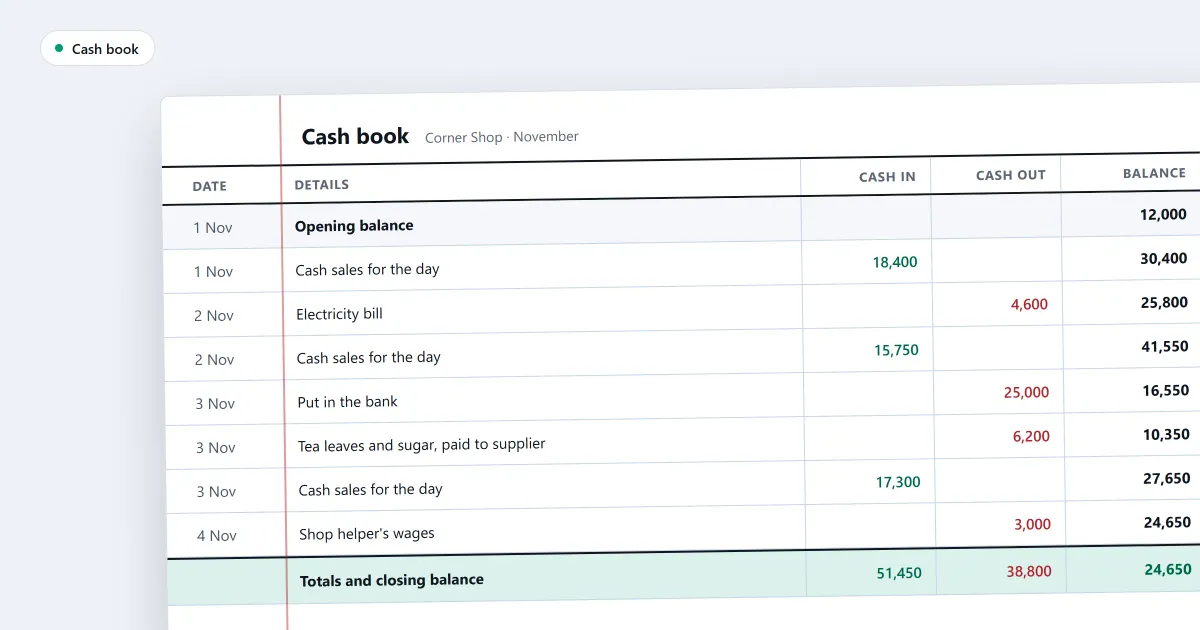
What should a cash book format for a small shop look like? It should be a plain record of every amount of cash that comes in and goes out, in the order it happened. This page gives a simple format, a worked example with invented figures, and what to enter each day. The last part says how SellyPOS keeps the money side of the same record.
What is a cash book?
A cash book is a record of every amount of cash that comes into the shop and every amount that goes out. It keeps a running balance after each entry. It holds only cash, so money in a bank account is kept in a separate record.
What columns does a simple cash book need?
A simple cash book needs five columns: the date, the details of each entry, the cash in, the cash out and the running balance. Write one entry on each line, in the order it happened. Use the cash in column for money received and the cash out column for money paid out.
Here is a sample for one day. Every figure is invented.
| Date | Details | Cash in | Cash out | Balance |
|---|---|---|---|---|
| 1 May | Opening balance | 100 | ||
| 1 May | Cash sales for the morning | 500 | 600 | |
| 1 May | Electricity bill paid in cash | 150 | 450 | |
| 1 May | Cash sales for the afternoon | 200 | 650 | |
| 1 May | Cash put into the bank | 400 | 250 |
Take the line for the electricity bill. The balance before it is 600, and paying 150 leaves 450. The bank line moves 400 out of the drawer, so the cash left is 250. Each balance is the one above it, plus the cash in, or less the cash out.
What do I enter in the cash book each day?
Each day, enter every cash sale, every amount paid out in cash, and every amount moved from the drawer to the bank. Start with the opening balance and end with a count of the drawer. Write any difference with its date and cause, and never change an earlier line to hide it.
- Write the opening balance from the drawer.
- Enter each cash sale, with the day’s date.
- Enter each cash payment out, with what it was for.
- Enter each move of cash to the bank.
- Count the drawer and write the closing balance.
- Write down any difference you cannot explain.
Is a cash book the same as a profit record?
No. A cash book shows the cash that moved, and the balance it leaves. A profit record also needs the cost of what was sold. Keep the two apart, so a large cash balance is not mistaken for profit. The page on how to track profit in a shop goes into that side.
Can I keep a cash book in SellyPOS?
Basic and Professional keep the cash book side: SellyPOS records what the shop paid out, moves money between your own accounts, and shows cash, bank and wallet balances. Every edition has a list of accounts with its balances. Lite has that list only, with its balances and totals.
Where SellyPOS stands
The expense and money screens are in Basic and Professional. The accounts list is in every edition.
- Record what the shop paid out. Enter what the shop paid out, with its category, its amount and the account it came out of. A recorded expense cannot be voided, and recurring expenses are not built. Basic and Professional.
- See this month’s expenses and their total. The expenses list shows the month so far, with a total for the expenses on the list. Basic and Professional.
- One list of accounts with balances. Money › Accounts has one row per account with its balance and last movement, a total, and a statement for any account. Reconciling an account against the bank and importing a bank statement are not built. Lite, Basic and Professional.
- Move money between accounts. Move money takes an amount from one account into another, and any fee is taken from the source account. A wrong move is voided by a new linked document, never edited. A picker for choosing which account pays the fee is not built. Basic and Professional.
- Cash, bank and wallet balances. Bank and till shows each cash, bank and wallet account at the start, the money in, the money out and the balance now. Money moved between your own accounts is not income or spending, and the page says so. The cash report, cheques and bank reconciliation are not built. Basic and Professional.
To record an expense, read how to record shop expenses in POS. To add a bank or wallet account and move money, read how to add a bank account in POS, and move money. The profit and loss software page and the money and accounts module cover the screens.
Next
Start tomorrow’s cash book with the opening balance counted from the drawer. For the day’s close, read an end-of-day checklist for a small shop. See the pricing page for the editions, and download SellyPOS.
