Warranty card format and how to track warranty
A warranty card format with the sold date and the end date, a sample as a table, and how SellyPOS keeps warranty on each product and on each device.
Short answer A warranty card is a short written record of what the shop promises for a product: the item, the sold date, the warranty length and the end date. Write the end date on the card and in your records, so both show the same date. SellyPOS keeps each sale's warranty end date.
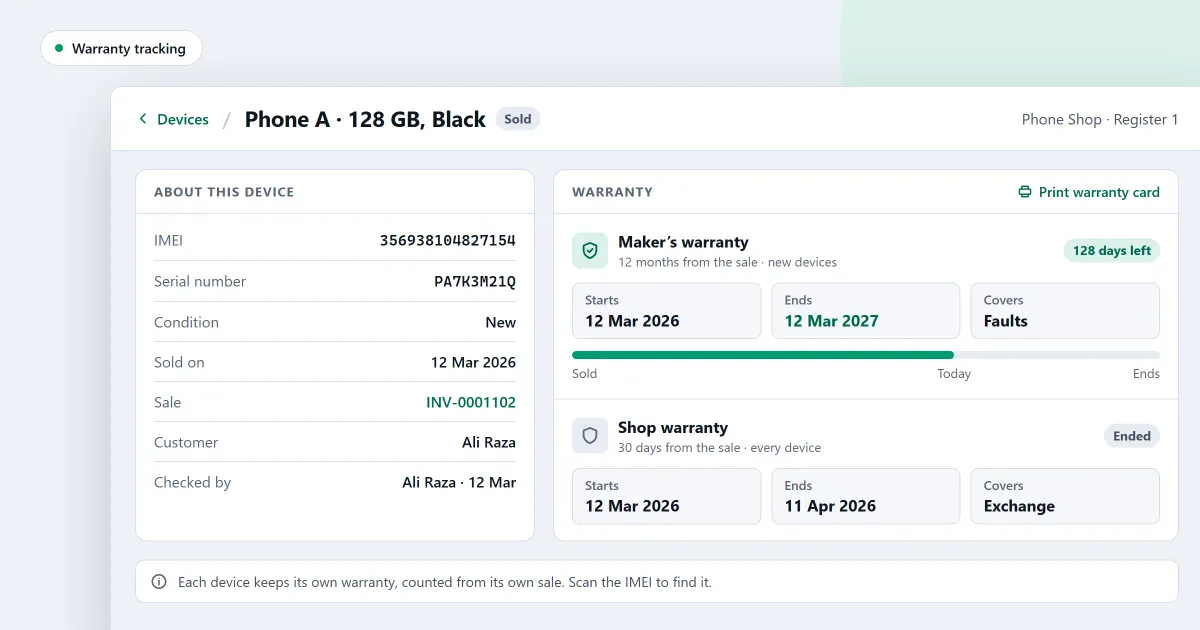
What should a warranty card format show? A warranty card is a small record that a shop gives with a product. A customer asks for it when something fails, and the shop needs the same dates on its own side. This page shows what the card should say, a sample in table form, and how to keep the dates straight. The last part says how SellyPOS tracks warranty.
What must a warranty card say?
A warranty card should say which product was sold, the day it was sold, how long the warranty runs, the day it ends, and what the warranty covers. Add the shop’s name and the customer’s name too. If a law in your country sets more, check the rules with the proper authority in your country.
How do I work out the warranty end date?
To work out the warranty end date, start from the sold date and add the warranty length. A sale on 5 March with a six-month warranty ends on 5 September. Write both dates on the card, and check the end date against the length before you hand it over.
Here is a sample card with invented details. Fill in your own shop’s wording and terms.
| Field | Entry |
|---|---|
| Shop | Example shop |
| Product | Mobile phone, black |
| Serial number or IMEI | Copied from the product box |
| Sold on | 5 March |
| Warranty length | 6 months |
| Warranty ends | 5 September |
| What is covered | Faults in the phone, not damage |
| Shop stamp or signature | Space for the shop’s stamp or signature |
The two date rows are the ones to check first. A card that says six months but ends on a date that is not six months later will cause a dispute later.
How do I keep the sold date and the end date?
Keep the sold date and the end date in the sale record as well as on the card. A lost card can then be rebuilt from the record, and the dates on both will match. Look up the record when a customer asks whether a product is still under warranty, and answer from the record, not from memory.
Can SellyPOS track warranty on each product?
SellyPOS gives a product one or more warranty covers, each with a length in days, months or years, and a sold item keeps its own copy of the warranty. On a device, a cover can be for new devices, used devices or every device. That device side is in Basic and Professional.
Where SellyPOS stands
Warranty covers on any product are in every edition. Warranty for new and used devices is in Basic and Professional.
- Warranty covers on any product. A product can have one or more warranty covers, each with a name and a length in days, months or years. A cover starts from the sale or from a date, and a product starts with none. A shop-wide default warranty and a category-level fallback are not built. Lite, Basic and Professional.
- A sold item keeps its warranty end date. Each sale keeps its own copy of the warranty, so changing a cover later does not change the end date on a sold item. The receipt shows that copy. Lite, Basic and Professional.
- Expiry and warranty on each product. On a product’s Expiry & warranty tab, set the warranty months and terms, along with the return window days. There is no batch screen, and batches do not show on labels or receipts. Basic and Professional.
- Warranty for new or used devices. On a device, each cover is for new devices, used devices or every device. A used device can carry the end date its own warranty has left, and Installed on starts a warranty that begins on a date, even after the sale. Warranty claims are not kept as a document. Basic and Professional.
To add a cover to a product, read how to track product warranty in POS. To set up the product itself, read how to add a product in POS. The mobile shop page with IMEI tracking covers devices, and the products and catalogue module sets out the product screens.
Next
Write one card for a product you sold last week, using the sample table, and check the end date by counting the months. For the phone side, read how to keep an IMEI register for a mobile shop. See the pricing page for the editions, and download SellyPOS.
Questions people ask
Can I track each phone in my shop by its IMEI number?
Yes. Each device is recorded by its own code: a phone by its serial number and one or two IMEI numbers, a laptop by its serial number, and a router by its MAC address. A code belongs to one device only, so the same IMEI cannot be recorded against two phones. The Devices list shows each device's state, and you can filter by state or type, or scan a code to open its page. A device's page lists each time it came into your shop, with the profit on each round for people who may see cost. See mobile shop POS software with IMEI tracking.
