Stock register format, and when software replaces it
A stock register format with date, in, out and balance columns, the three mistakes registers collect, and the point where stock software is the better record.
Short answer A stock register format is a page with one line for each movement of a product: the date, what came in, what went out, and the balance after it. Keep the balance on every line. Move to software when the register is hard to keep right or many people write in it.
What does a stock register format look like, and when should a shop give it up for software? A shop can keep a stock register by hand, and it works while the list of products is short. This page gives a format for paper, the three mistakes that spoil a register, and the point where software becomes the better record.
What is a stock register?
A stock register is a running record of how many units of a product the shop holds. Each movement adds a line: stock received, stock sold, stock returned and stock taken off for damage or loss. The last figure on the page is the stock on hand, which you can check against the shelf.
What columns does a stock register page need?
A stock register page for one product needs five columns. They are the date, a short detail, the in column for stock received, the out column for stock sold or lost, and the balance after each line. Put one product on each page or each block. That way the balance of one product is never mixed with another.
Here is a sample for one product, a notebook, A5. The figures are invented for the example.
| Date | Detail | In | Out | Balance |
|---|---|---|---|---|
| 1 March | Opening balance | 20 | ||
| 2 March | Sold | 3 | 17 | |
| 3 March | Received from supplier | 10 | 27 | |
| 4 March | Sold | 5 | 22 | |
| 5 March | Damaged, taken off the shelf | 2 | 20 |
Read the balance down the last column. On 3 March the balance is the 17 from the line above, plus the 10 received, which makes 27. Each balance starts from the line above it, so one wrong figure carries down every line after it. That is why a register that does not agree with the shelf must be checked from the top.
What mistakes do stock registers collect?
Three mistakes spoil stock registers: a balance that is not updated on each line, a movement with no reason written beside it, and a count that is never checked against the shelf. Each one lets the balance drift from the real stock, and the drift grows the longer the register is kept.
- A balance not carried down. The new balance is written on some lines but not all, or it is worked out in the head and never written.
- A movement with no reason. Stock went out and nobody wrote why, so a sale, a loss and a mistake look the same.
- No check against the shelf. The register says 27 and the shelf holds 24, and the gap sits there for months.
The fix is the same each time. Write the balance on every line, write a reason on every out line, and count the shelf against the page at a set time, such as the end of each week. Write any difference down with its date.
When should a shop replace its register with software?
Move to stock software when the register is hard to keep right: many products, several people writing in it, or a need to know the balance on a past date. Software works out the balance from each movement, so the balance is not written by hand. Run both for a short time and compare them with the shelf.
The signs show in the work. The owner finds figures that do not match the shelf. The same item is written twice. A customer asks whether an item is in stock, and nobody can answer without a long search. Those signs say the register has outgrown the paper.
Where SellyPOS stands
SellyPOS keeps the stock on hand for each product, and each figure opens to the movements behind it. Lite is free for ever and holds up to 20 products, so a shop with more products needs Basic or Professional.
- Stock on hand for every product. The stock list shows each product with its quantity on hand. Sort it by quantity or by value, and open a row to see that product’s movements and the document behind each one. Lite, Basic and Professional.
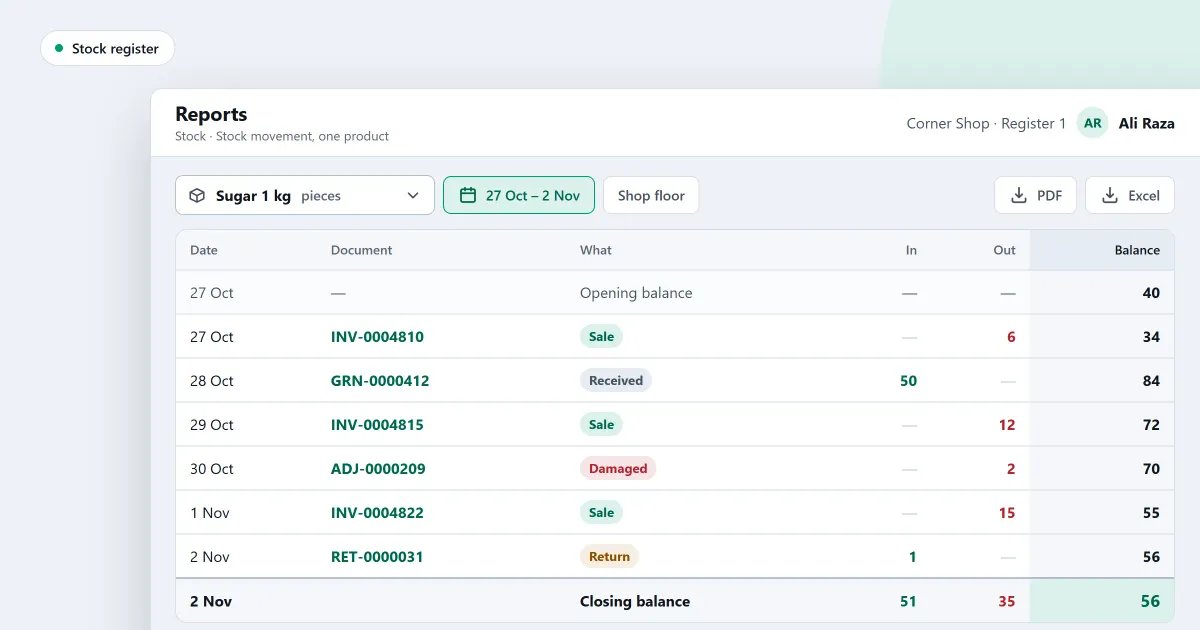
- Stock movement for one product. The stock movement report lists one product’s movements, newest first, with a strip that adds up: opening, plus received, less sold, plus returned, less adjusted, equals what is on hand. Document numbers, the person who made a movement and its note are not built on this report. Basic and Professional.
- Adjust stock with a reason. Make an adjustment to add or take away stock. Every adjustment needs a reason and is saved as one numbered document. Lite, Basic and Professional.
- A list of past adjustments. The Adjustments tab lists past adjustments, newest first, with the number, the day, the reason, the line count and the value. Lite, Basic and Professional.
- Void an adjustment. Void an adjustment with a reason, and the shop records a new document that names the one it reverses. The original adjustment is never edited. Lite, Basic and Professional.
The strip on the stock movement report adds up the same way as the balance column in the sample above. To adjust a figure, read how to adjust stock and record why. To count the shelf, read how to count your stock. The stock control module and the inventory software page for a small shop cover the rest.
Next
Copy the sample table onto paper for one product this week, and check its last balance against the shelf. For a printable count sheet, read the stock take sheet template. See the pricing page for the editions, and download SellyPOS.
