How to choose a barcode scanner for a small shop
How to choose a barcode scanner for a small shop: wired or wireless, handheld or stand, the codes it must read, and the test to run before the first sale.
Short answer A barcode scanner for a small shop should read the codes printed on your products, sit where the cashier can reach it, and pass a test before the first sale. Choose wired or wireless, and handheld or stand, by how the counter is set out. SellyPOS adds a scanned product to the sale at once.
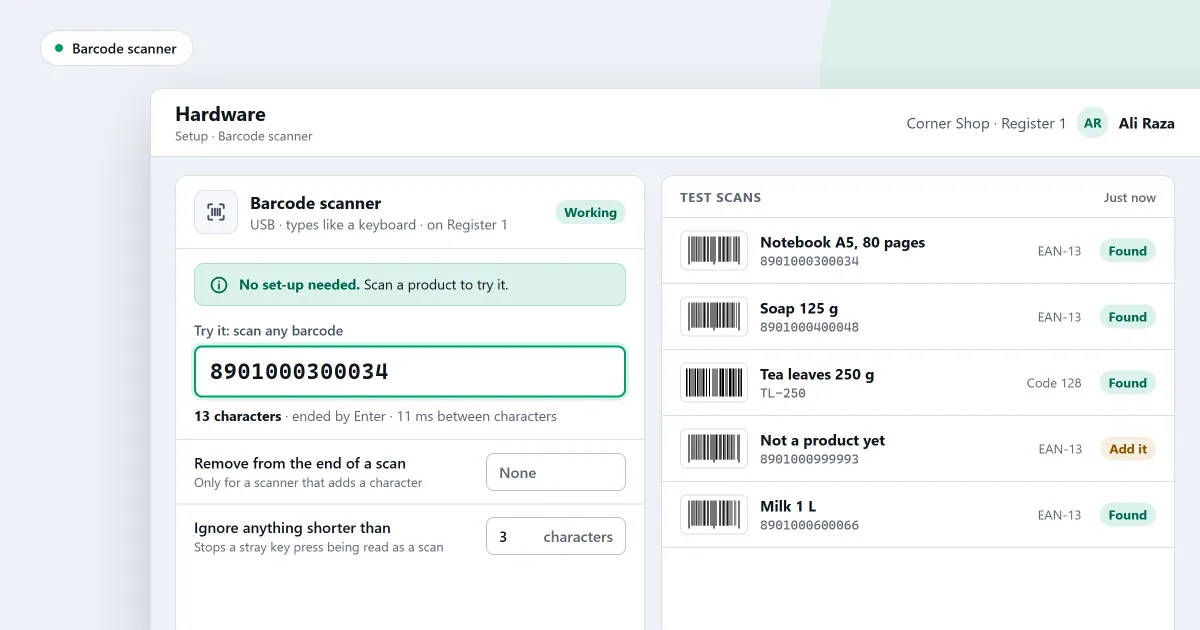
Which barcode scanner for a small shop is the right one? Start with the counter itself. Where does the scanner sit, who uses it, and which codes are printed on the goods you sell? A scanner that suits one counter may not suit another. This page covers the choices in order, the sum that tells you whether a scanner pays its way, and the test to run before your first sale.
Is a wired or a wireless scanner better?
A wired or a wireless scanner suits a different counter. A wired scanner plugs into the computer and needs no charging. A wireless scanner gives the cashier more room, but it needs charging or batteries, and it must stay in range of its receiver. For one counter that stays in one place, wired is simpler.
For a shop where staff move around, a wireless one may suit better. Whichever you choose, keep a spare cable or a charged battery at the counter. A scanner that stops working in the middle of a busy hour stops the sale.
Is a handheld or a stand scanner better?
A handheld or a stand scanner suits a different way of working at the counter. A handheld scanner is lifted for each item and pointed at its code. A stand scanner stays on the counter, and the cashier passes each product across it. Pick the type that matches how the cashier already handles goods.
Whichever type you pick, check it with a few real products from your own shelves before you buy more than one.
Which codes must the scanner read?
The scanner must read the codes printed on the products you sell. Look at those codes before you buy, and check a sample of each kind, such as a boxed product and a loose item. A scanner that reads one kind of code may fail on another, so test with your own goods.
Some products have no barcode at all. Give them one before you print labels, so every product in the counter list can be scanned.
Is a scanner worth its price for my shop?
A scanner is worth buying when the time it saves at the counter, added up over a day, is more than its price spread over the years you will use it. Work out that figure for your own counter, using the number of items you sell in a day.
For example, suppose a cashier takes 6 seconds to type a code and 1 second to scan it. That is 5 seconds saved on each item. On a day with 200 items, the scanner saves 1,000 seconds, which is 16 minutes and 40 seconds. Whether that is worth the cost is for the shop to decide.
What is the test before the first sale?
The test before the first sale is a scan of one of your products into the test box. It shows the text, how long it was, and whether it ended with Enter. Repeat it for each kind of product you sell, including any with a damaged or dull label.
Start the first sale only once every kind reads correctly.
Where SellyPOS stands
SellyPOS works with a barcode scanner in every edition. The rows below give the edition of each part.
- The test box. The scanner tab has a try-it box. A scan shows what arrived, its length and whether it ended with Enter. It looks nothing up. Lite, Basic and Professional.
- A scanned product. A scanned code that matches a product exactly is added to the sale at once, with no Enter press. The scan makes a sound, and a failed scan sounds different. Lite, Basic and Professional.
- One entry field. One field works out what was typed. An exact barcode, SKU or code adds the product at once, and anything else opens a search list. Detecting a scanner from its raw input is not built yet. Lite, Basic and Professional.
- A damaged label. Type the last few digits of a barcode, and the matching product appears. Lite, Basic and Professional.
- A product with no barcode. Press Generate barcode on the product’s form. The code uses the shop’s own prefix, and a number is never reused. Lite, Basic and Professional.
- Counting by scanning. Scan a product’s barcode, enter the quantity, and the next scan follows. The mouse is never needed to count. Counting on two terminals at once is not built. Basic and Professional.
The barcode scanning page sets out the counter side in more detail. The barcodes and labels section covers codes for products that have none.
Next
Read what hardware a POS system needs for the full set of parts, then count your stock to use the scanner for a stock count. The stock control module shows how a count fits with the rest of the shop. Check the prices on the pricing page, then download SellyPOS.
Questions people ask
Do I need a receipt printer or a barcode scanner?
No. Without a barcode scanner, you find products by typing their name or code, and receipt printing can be turned off when no printer is connected. When you add a receipt printer, SellyPOS works with 58 mm and 80 mm thermal printers over USB or Bluetooth. Hardware it works with.
