Cash memo and bill book format for a shop
A cash memo and bill book format for a shop, as a sample table, with why the number and duplicates matter, and how SellyPOS numbers and prints the record.
Short answer A cash memo is a short written record of a cash sale, with a number, date, items, amounts and the total paid. A bill book keeps the memos in number order. This page gives a format as a table, explains numbers and duplicates, and says how SellyPOS numbers and prints the same record.
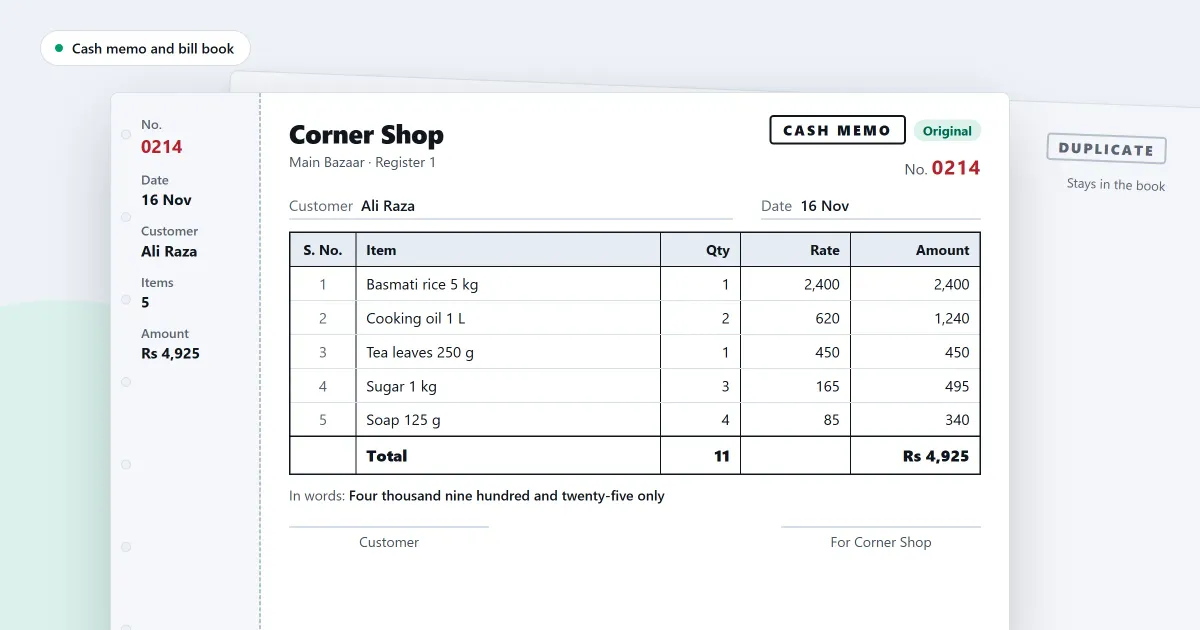
A cash memo format is the layout of the slip a customer takes home when they pay at the counter. A bill book keeps those slips in order, so the shop can find any one of them later. This page gives a format you can copy, shows why the number matters, explains duplicates, and says how SellyPOS handles the same record at the counter.
What does a cash memo show?
A cash memo shows the shop’s name, a number, the date and the customer’s name if you know it. It also lists each item with its quantity, rate and amount, the total, and how it was paid. Keep the same lines on every memo, so any memo can be read without asking the cashier.
Header of the memo:
| Field | Entry |
|---|---|
| Shop | Shop name and phone number |
| Memo number | 0231 |
| Date | 4 November 2026 |
| Customer | Walk-in customer |
| Paid by | Cash |
Items and totals:
| Item | Quantity | Rate | Amount |
|---|---|---|---|
| Biscuit packet | 4 | 120 | 480 |
| Soap bar | 2 | 90 | 180 |
| Tea, 250 g pack | 1 | 300 | 300 |
| Total | 960 | ||
| Cash received | 1,000 | ||
| Change given | 40 |
Why does the memo number matter?
The number on a cash memo lets you find a sale later, and it shows that no memo was skipped. Use one numbered series for each book, write the numbers in order and never reuse one. A spoiled memo stays in the book, marked void, so the series has no hidden gap.
If a book runs from 0231 to 0240 and 0235 is missing, the owner can ask where it went before the day closes. Without a number on each memo, nobody would know that a memo was ever written.
What should you check before you hand over a memo?
Check the memo against the goods on the counter before the customer leaves. Read the total and the change out loud, and write the number in the book first. A memo with a wrong total should be voided and written again, not corrected by hand.
- Write the number in the book. Do this before the memo is handed over, so no memo leaves the counter unrecorded.
- Check each item and rate. Compare them with the goods the customer is taking.
- Work out the total and the change. Say both figures to the customer.
- Keep the copies apart. The shop’s copy stays in the book, and the customer takes theirs.
What is a duplicate?
A duplicate is a second copy of a memo, marked so that nobody takes it for the original. Write the word DUPLICATE on it, with the date and the name of the person who made the copy. Keep it in the book beside the original, so the two can be checked against each other.
Where SellyPOS stands
SellyPOS prints a sale receipt at the counter. The rows below describe what that receipt does and how its numbers and reprints are kept.
- Print the receipt when the sale is finished. When a sale is finished, the completion step offers Print receipt. For a shop set to always print its receipt, the receipt is still printed before this step. Lite, Basic and Professional.
- Numbers from your own pattern, never reused. Each document type has its own number series, with a prefix, a suffix, a zero-padded length, a start and an increment. A number is never used twice, even after a Void. Basic and Professional.
- Reprints marked as duplicates. A reprint of an older receipt is marked as a duplicate, and the record shows who reprinted it and when. Reprinting past a set count needs permission. A reprint of a voided document is marked VOID. Lite, Basic and Professional.
- Amount in words. The sale receipt and its reprint can carry a line that spells the amount in words, and a setting turns it on or off. Other documents are not included. Lite, Basic and Professional.
The steps for a reprint are in how to reprint a receipt, and the receipt layout is set in how to customise a receipt. The printing side is covered on the receipt printing page, and the counter itself on the sales counter module page.
Next
For the lines of a full-page bill, read invoice format for a small shop. Compare the editions on the pricing page, or download SellyPOS to see the receipt on your own computer.
Questions people ask
Can I edit a sale after it is finished?
A finished sale is never edited in place, but it can be corrected. A manager or owner chooses Correct this sale, which reopens it in the cart, and finishing replaces the original with the corrected sale. You can also make a return or an exchange against it. Either way the records show what happened and when.
