A quick word before you download
You may see a warning from your browser or from Windows when you download SellyPOS. This is expected for a new program that is not yet signed with a company certificate. Here is why, in brief.
What you may see
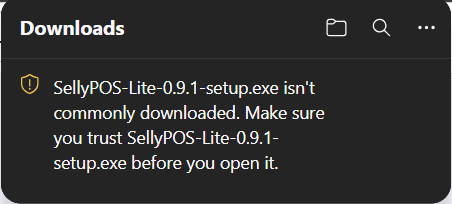 In Edge, a shield warns that the file is not commonly downloaded.
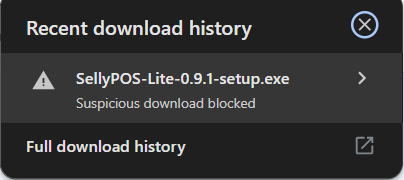 Chrome says Suspicious download blocked, in stronger words than Edge uses.
- Why the warning appears SellyPOS is new, and its installer is not yet signed with a company certificate. Browsers and Windows warn about a program that has no certificate and few downloads so far.
- What the warning does not mean The warning is a check based on reputation. It is not a finding that SellyPOS is harmful, and it does not mean the file is bad.
- Windows 11 may block it On Windows 11, Smart App Control can block an app that has no company certificate. It may block SellyPOS, or let it run with no message. We cannot promise either way.
- The installer comes from our own address, dl.sellypos.com, over HTTPS.
- Before each release, we send the installers to Microsoft's malware analysis service.
- Updates the program installs are checked against a key built into the program.
- Every change the installer makes to your computer is listed in our help.
If you see a warning
- Your browser shows a warning In Edge, open the three dots, choose Keep, then Keep anyway under the arrow beside Delete. In Chrome, click the file and choose Download suspicious file.
- Windows protected your PC Choose More info, then Run anyway. Windows then asks for administrator approval, and you choose Yes.
- Windows blocked SellyPOS Read the Smart App Control help before you change any Windows setting. It explains your choices and what turning the setting off means.
Why your browser warns about SellyPOSAbout the publisher warningAbout Smart App Control